
An Instagram bio generator gives you a ready bio in seconds, written for your category, language and style. Pick your options, add a few details if you like, and copy the result straight into your profile.
Instagram Bio Generator
Pick a category, get ready-to-use bios, and copy one in a tap. Add your name or niche to personalise them, switch emojis on or off, and check the 150-character limit as you go.
Choose your bio
Add your name or niche (optional)
A short word works best, such as travel, fitness, photography or fashion. Leave these blank to get only ready-made bios.
Stylish text and spacing
Stylish fonts change English and Hinglish letters only, not Hindi (Devanagari) letters. Stylish letters are special Unicode symbols. They work in a bio but some phones show them as boxes, and screen readers may skip them. A blank line uses an invisible character that counts toward the 150 limit.
Your bios
Edit and check a bio
How to use your bio
Copy a bio, open Instagram, tap Edit profile, tap Bio, paste it and save. Instagram currently allows 150 characters, and a line break counts as one character.
Pick a bio that fits who you are, then change a word or two so it sounds like you. Putting your niche or city in the first line helps people find you in search.
The bios here are written for this tool and are free to use. Instagram may count some stylish symbols as more than one character, so check the count after you paste.
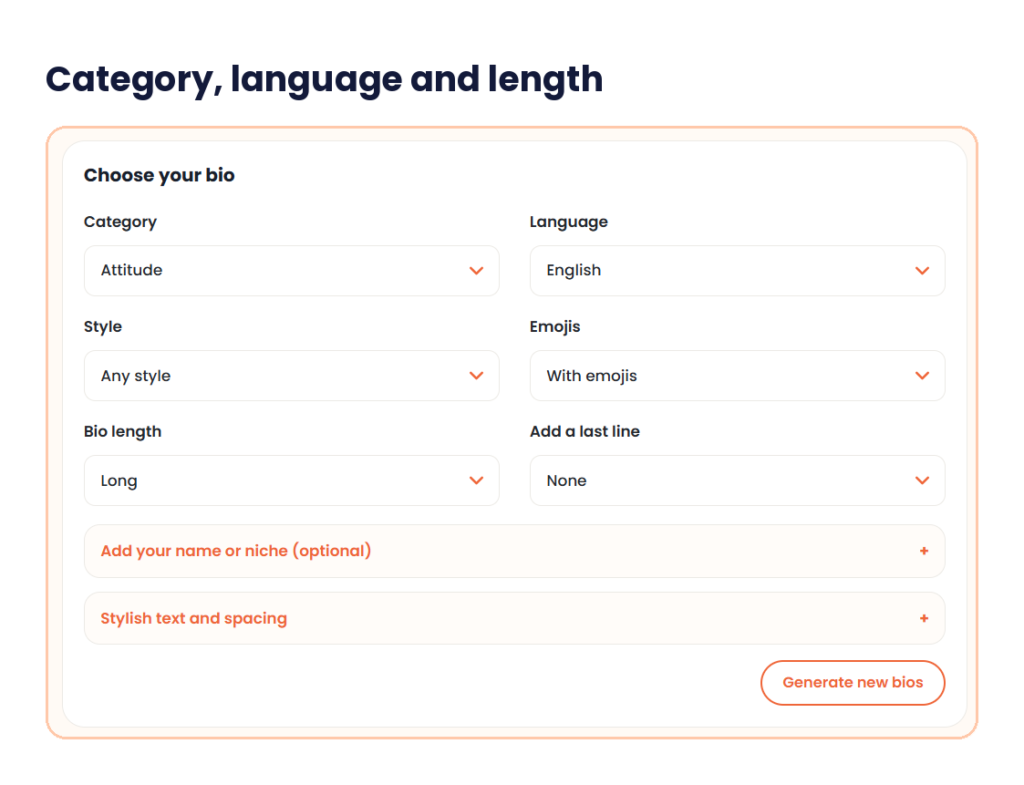
This Instagram bio generator starts with a Category menu: boys, girls, attitude, aesthetic, funny, love, gaming, creator and business. Next you choose a Language (English, Hindi or Hinglish), a Style, whether to use emojis, and a bio length of Short, Medium or Long. Add a last-line menu and an optional Add your name or niche box let you add your name, your interest and your city.
A Stylish text and spacing section controls fonts and line breaks. Generate new bios gives you a batch. An Edit and check a bio box shows a live count out of 150 before you copy.
What is an Instagram bio generator?
An Instagram bio generator is a tool that writes a short profile bio from a few choices. You do not start from a blank box. You choose who you are and how you want to sound, and it gives you lines to edit.
You may also see it called an Instagram bio maker, a bio maker instagram users search for, an Instagram bio writer, or a bio maker for Instagram. The job is the same. It saves you the first draft, and it checks the length so the text fits.
A good bio for Instagram does three things. It says who you are, gives a reason to follow, and ends with a small next step, such as DM for orders. The tool gives you the wording. You decide which details are true for you.
How to use the Instagram bio generator in 3 steps
No account is needed. A first bio takes about a minute.
Step 1: Choose your bio
Open the Choose your bio section. Pick a Category, then a Language and a Style. Style starts on Any style, so you can leave it alone. Set Emojis to With emojis, Without emojis or Show both versions. Then pick a Bio length: Short, Medium or Long. The Add a last line menu starts on None.
Step 2: Add your details and generate
Open Add your name or niche (optional) if you want the bio to mention you. It has three boxes: Your name, Interest or niche and City or area. The examples in the boxes are Aarav, travel and Pune. A short word works best, such as travel, fitness, photography or fashion. Leave the boxes blank to get only ready-made bios. Stylish text and spacing is a second section with Stylish font, Apply font to and Line spacing. Click Generate new bios. Your bios appear in a list, and you can click again for a fresh batch.

Step 3: Edit, check the count and copy
Pick a bio and open the Edit and check a bio box. A green counter shows how many of the 150 characters you have used. Change a word, then click Copy. Add spacing and Remove spacing change the line breaks, and Clear empties the box. In Instagram, open Edit profile, tap Bio and paste.

My test: an attitude bio
I used the Attitude category in English with the Long bio length and opened one result in the Edit and check a bio box. It had four lines.
Rules? I wrote my own. / Be the reason they talk about you. / Different mindset, different level. / Always on top, never on hold.
The counter showed 123 / 150, which leaves 27 characters. Long bios fill most of the limit, so a Long bio leaves little room for a name or city. Check the counter again after any edit, and confirm the length in the Instagram app before you save.
Instagram bio ideas for every category
Before you open the Instagram bio generator, look at these examples. They are written for this page, so you can see the shape of a good bio for each category. They are samples, not tool output, and each one uses three short lines. The character count includes the line breaks, and none of the samples use emoji.
| Category | Example bio | Characters |
|---|---|---|
| Boys | Quiet mind, loud goals. / Gym, Code, Chai / Delhi | 45 |
| Girls | Big dreams, small posts. / Chai first, plans later. / Mumbai | 56 |
| Attitude | My peace is not for sale. / Work hard, stay low. / Jaipur | 53 |
| Aesthetic | Soft light and slow mornings. / Film, Books, Rain / Pune | 52 |
| Funny | Professional overthinker. / Amateur chef. Full-time snack lover. / Bengaluru | 72 |
| Love | Home is wherever you are. / Married to my best friend. / Chennai | 60 |
| Gaming | BGMI grinder, Squad leader / Streams Mon to Fri, 8 PM / Join the squad, link below | 78 |
| Creator | Travel reels from small towns. / New video every Friday / Collabs: DM | 65 |
| Business | Handmade soy candles / Shipping across India / Orders by DM | 55 |
The slash in the table marks a line break. Your own count in the tool is the number to trust.
Notice the pattern. Each bio opens with a line of personality or a clear offer, adds one or two facts, and ends with a place or an action. A business bio leans on the offer and the way to order. A personal bio leans on a mood and a city.
The 150-character limit
Instagram allows 150 characters in a bio, and the Instagram bio generator shows your count as you edit. Spaces, punctuation, line breaks and emoji all use up the limit, so check the count before you paste. Instagram can change this, so confirm the number in the app or in Instagram’s Help Center. The name field is separate and shorter, at around 30 characters.
Here is the first bio from the table: Quiet mind, loud goals. / Gym, Code, Chai / Delhi, set on three lines. The first line is 23 characters, the second is 15 and the third is 5. Add two line breaks and the total is 45. That leaves 105 characters free.
Plan your lines before you write. Put the most useful words first, because that is what people read. A short bio of one or two lines suits a personal profile. A medium or long bio suits a business that needs to say what it sells and how to order. The Short, Medium and Long options in the tool help you pick the length, and the counter in the edit box tells you when you are close.
Instagram bio generator with emoji
Emoji add tone and break up text, but a few go a long way. Two to four is a good range. A row of the same emoji looks messy and uses up characters. If you want a divider line from one symbol, our text repeater can repeat it for you.
Take the boys bio above. With a muscle, a laptop and a cup of tea added to the second line, it reaches 51 characters by my count. Some apps count an emoji as more than one character, so use the counter in the edit box and not a guess.
Use the Emojis setting of the Instagram bio generator to see both versions. Show both versions gives you a plain bio and an emoji bio side by side, which helps you compare.
Instagram bio spacing and line breaks
Line breaks make a bio easy to scan, and the Instagram bio generator lets you control them. The Line spacing setting starts on As written, which keeps a normal stack of lines. Its other choices are a blank line between lines and one line separated by a bar. Pick the one line option when you want a tight, compact look.
Add spacing and Remove spacing change the breaks after you generate. If the spacing looks different on your phone, paste it into the edit box first and check the count. Each line break uses a character.
Stylish fonts in the Instagram bio generator
The Stylish font menu starts on Normal and can change your text into fancy letters. Apply font to is set to First line only, and you can switch it to the whole bio.
These fonts are special Unicode characters, not real fonts. That has a cost. Screen readers may read them badly. Older phones can show empty boxes. Search may not match your words. Use a stylish font on one line, such as your name, and keep the rest plain.
Hindi and Hinglish: Instagram bio generator languages
Many people write their bio in Hindi or in Hinglish, which is Hindi written in English letters. See Hinglish for the background. Both are in the Language menu.
Here are two samples. The Hinglish one reads Delhi se, dil se. / Bade sapne, chhote posts. / Chai aur code, and it is 57 characters. The Hindi sample uses Devanagari: सादगी में ही सुंदरता है। / सपने बड़े, कदम छोटे। / लखनऊ, and it is 50 characters by a plain count.
Hindi text can use more of your limit than it looks, because letters and vowel signs may count separately. Always check the counter before you post.
Make your own bio from your details
A generated bio works best when you add your own facts. Use the last line boxes in the Instagram bio generator for your name, your niche and your city. Then follow a simple pattern: who you are, what you offer, and what to do next.
For example, a photographer in Pune could write Wedding photographer in Pune, Candid stories, no stiff poses and Book a date: DM. On three lines that is 75 characters, with 75 left to spare.
Change one detail in any generated bio. A different city, a different hobby or a different verb makes it yours. If you also need a handle that matches, try our username generator. The tool gives sample lines from templates and your inputs, so another person may get something close. Your edit is what makes it unique.
Choosing a bio by goal
A personal profile needs a mood and a place. Short lines with one or two emoji work.
A creator needs a topic and a reason to follow. Say what you post and how often, and add a collab line.
A business needs the product, the area it ships to and how to order. Put the action in the last line.
A student or a job seeker can name a course, a city and a field. Keep it plain. The Instagram bio generator covers each of these goals through its categories and styles.
Links do not go in the bio text. Use the profile Links option for your website or shop. To send people to your profile from a poster or a printed card, make a QR code that opens it.
Common mistakes when writing a bio
- Going over 150 characters. Instagram will cut it off or block the save.
- Using too many emoji. Two to four is enough.
- Writing everything in stylish fonts. Keep most of the bio in plain text.
- Copying someone else’s bio word for word. Change a detail.
- Leaving out your niche or city. They help people understand you in one glance.
- Skipping the action. A clear last line like DM for orders gives people a next step.
Quick answers before you start
What is an Instagram bio generator?
An Instagram bio generator writes a short bio from your category, language and style. You edit the result and copy it into your profile.
How do I use an Instagram bio maker?
Pick a category, language and style. Set emojis and length, add your details, generate, then edit and copy the bio into Edit profile.
How many characters can an Instagram bio have?
150, counting spaces, emoji and line breaks. Check the app in case the limit changes.
Can I get a bio for Instagram in Hindi or Hinglish?
Yes. The Language menu has English, Hindi and Hinglish. Check the character count, since Hindi can use more of the limit than it looks.
Do stylish fonts hurt my profile?
They can. Screen readers may misread them, and older phones can show boxes. Use them on one line only.
Is this Instagram bio writer free?
Yes. It is free. Bios come from templates and your inputs, so edit one detail to make yours different.
Open the Instagram bio generator, start with the category that fits you, pick a length, then generate a few batches and keep the best two lines. Check the count in the edit box, paste it into Edit profile and look at how it reads on your phone.