
A text repeater copies a word, line, emoji or message as many times as you ask, in one click. Type or paste your text, pick a count and the result is ready to copy.
This online text repeater has three parts. In Enter your text you type or paste what to repeat, or upload a .txt file. A row of Quick insert emoji adds a symbol with one tap. Below it you set a Separator and the Repetition times. Click Repeat text and the Result card shows your output with counts for characters, words and lines. Copy puts it on your clipboard, Download .txt saves a file, and Clear starts again.
Text Repeater
Type or paste text, set a separator and a count, then copy the result. Nothing leaves your browser.
Enter your text
Quick insert
Result
What is a text repeater?
A text repeater is a small tool that repeats text for you. You give it a piece of text and a count. It joins the copies with a separator and hands back one long block. You may also see it called a repeat text generator.
You can do the same job by hand. Copy a word, paste it ten times and you are done. At 500 copies, hand pasting gets slow and easy to get wrong. A text repeater online does it in a moment, and the Result card tells you the exact length.
How to use the text repeater in 3 steps
No account or app is needed. A first run takes about 20 seconds.
Step 1: Type or paste your text
Type in the Enter your text box, or click Paste to bring in what you copied. To repeat a whole file, click Upload .txt file. Under the box, Quick insert has one-tap emoji: fire, heart, laughing face, thumbs up, party popper, 100, sparkles, folded hands, heart eyes, flexed arm, smiling face and clapping hands. A plus button sits at the end of the row.

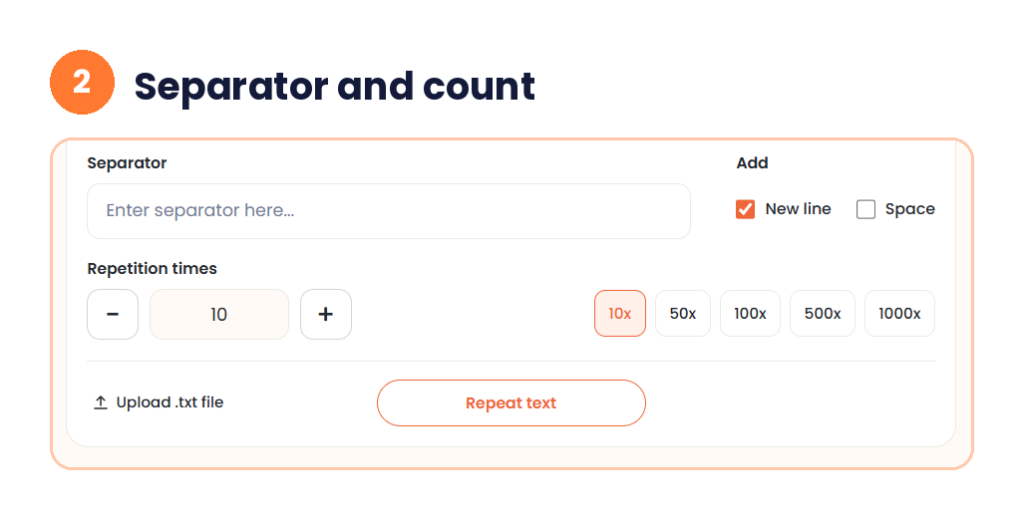
Step 2: Set the separator and repetitions
The Separator box takes any text you want between copies. Next to it, under Add, you can tick New line or Space. New line is ticked by default. Under Repetition times, type a number, use the minus and plus buttons, or click a shortcut: 10x, 50x, 100x, 500x or 1000x.
Step 3: Click Repeat text and copy the result
Click Repeat text. The Result card shows three counts (characters, words and lines) and the repeated text in a scrollable box. Click Copy to paste it into a chat, a document or a form. Click Download .txt for a plain text file, or Clear to reset.

My test: Hello and a thumbs-up, 10 times
I typed the word Hello followed by a thumbs-up emoji, left New line ticked and set 10 repetitions. The Result card showed 79 characters, 10 words and 10 lines.
The 79 is worth a closer look. There are 9 new lines between 10 copies, which leaves 70 characters for the copies themselves. That is 7 per copy. Hello is 5 characters, so the thumbs-up counted as 2. Many tools count an emoji as two characters, because of how text is stored. Other emoji may count differently, so check the Result card when the exact length counts.
Text repeater online: how long will the output be?
You can work out the length before you click. The formula is: total characters = (characters in one copy x repeats) + (separator characters x gaps between copies). The gaps are one fewer than the repeats. A newline counts as one character.
Here is the table for my test text, Hello plus a thumbs-up, which is 7 characters per copy, with New line ticked. The 10x row is the real result from the tool. The rest follow the formula.
| Repetitions | Characters |
|---|---|
| 10x | 79 |
| 50x | 399 |
| 100x | 799 |
| 500x | 3,999 |
| 1000x | 7,999 |
Plain words are shorter. The word Hello alone is 5 characters, and with a new line between copies each repeat adds 6, so 100 copies give 599 characters.
Text repeater for WhatsApp
People search for a text repeater whatsapp tool and for a text repeater for WhatsApp, and the use is simple. You make the block here, click Copy, open a chat and paste. It works like any other copy and paste. Use this page directly. You do not need to install an APK from an unknown source.
One limit to know about. A single WhatsApp message is commonly reported to hold up to 65,536 characters. WhatsApp can change this, so treat it as a guide. With the plain word Hello and a new line between copies, each repeat uses 6 characters, so the largest block is about 10,922 repeats, which gives 65,531 characters. Emoji count for more, so the safe number is lower.
A few habits keep things friendly. Start with 10 or 50, not 1000. Large counts can slow the page or the chat app. Send a long repeated message to someone who is expecting it. A flood of identical messages annoys people, and WhatsApp can restrict accounts that send unwanted bulk messages, so read its rules first.
Repeat text messages: five ready recipes
If you want to repeat text messages for fun or for work, these recipes show the settings. I worked out the lengths by hand from the formula above. Check them on your Result card.
- Field length test. Type abcde, untick New line, leave the Separator empty and set 51 repetitions. That makes 255 characters, which is a handy length for testing a form field.
- Divider line. Type a dash, untick New line, leave the Separator empty and set 40 repetitions for a 40 character line in notes or a text file.
- Birthday banner. Type Happy Birthday!, tick Space, untick New line and set 3 repetitions. The result is 47 characters, one banner line ready to paste into a card.
- Emoji row. Click the fire emoji in Quick insert, untick New line and set 10 repetitions. You get a row of ten for a chat or a status message.
- Practice lines. Type a spelling word, keep New line ticked and set 20 repetitions. Print the page for handwriting practice.
Need the repeated text as a document? Paste it into our text to PDF converter and download a PDF. For placeholder content, repeat a short phrase and replace it later. Lorem ipsum is the classic choice.
Separator options and what they do
The options make this repeat text generator more useful than a copy and paste.
New line puts each copy on its own line. It is the default and the best choice for lists and for counting lines. Space puts a space between copies, which suits a sentence or a banner. The Separator box takes anything else you type, such as a comma, a dash or a short word. Leave New line and Space unticked with the Separator empty and the copies run together with nothing between them.
Upload .txt file lets you repeat the contents of a file instead of typing. Paste fills the box from your clipboard in one click.
Common mistakes
- Setting the count too high for the app you will paste into. Start small and raise it.
- Leaving a space or empty line at the end of the text box. It repeats too, and your counts will look off.
- Forgetting the separator. If every copy runs together, check that New line or Space is ticked.
- Expecting emoji to count as one character. The tool counted one thumbs-up as 2.
- Pasting a large result into a field with a character limit. Check the limit first.
Do not paste passwords or private details into any online tool. Repeat harmless text only.
Quick answers before you start
What is a text repeater?
A tool that repeats your text a set number of times and joins the copies with a separator. You can pick 10, 50, 100, 500 or 1000 repetitions with one click, or type your own number.
How do I use a text repeater online?
Type or paste your text, choose a separator, set the repetitions and click Repeat text. Then click Copy or Download .txt.
Can I use the text repeater for WhatsApp?
Yes. Make the block here, copy it and paste it into a chat. A single WhatsApp message is commonly reported to hold up to 65,536 characters, so keep your block under that.
What is a repeat text generator?
It is another name for a text repeater. It creates many copies of your text without hand pasting.
Can I repeat emoji?
Yes. Use the Quick insert row or paste any emoji into the box. Emoji count as more than one character, so the Result card will show a bigger number than you might expect.
Is this text repeater free?
Yes. It is free and needs no signup.
Start with a short test, like 10 repetitions of one word, and read the counts on the Result card. Then raise the number, change the separator and copy the result where you need it.