
A passport size photo maker has become the first stop for anyone filling out a government form in India. You need a compliant photo whether you’re applying for a passport, sitting an exam, or updating your Aadhaar card. And it has to match an exact size, background, and quality standard, every single time.
Most people don’t own a proper photo studio at home. Running to a local shop feels like a waste of time when all you need is a digital file. That’s where a passport photo maker comes in handy. Upload one picture, crop it correctly, download a ready-to-use file. A couple of minutes, no money spent, no leaving the house.
Passport Size Photo Maker
Crop your photo to passport, visa or ID card size and compress it under a target KB size. Everything happens inside your browser. No uploads. 100% private.
Drag & drop your photo here
or click to browse — you can also paste an image with Ctrl/Cmd + V
Supports JPG, JPEG, PNG, WEBP · Max 25MB per file
Selected Photos 0
Select Size
= 413 × 531 px
Compress Image
The tool automatically adjusts quality to get your photo as close to this size as possible.
Background color fills any transparent area — it does not remove an existing background from your photo. Use Crop & Adjust below to frame your photo before creating it.
Creating Photo…
Summary
Results
Crop Photo
Drag the photo to reposition it, and use the zoom controls to fit it perfectly.
Passport Size Photo Maker: How It Works
A passport photo maker is a small editing tool with one job. It resizes and reshapes any photo to the exact size and format official forms want. That’s not the same as cropping a picture in your gallery app. These tools follow fixed measurements, usually 2×2 inches for Indian passports or 35×45mm for exam and visa forms. They center your face, adjust the background, and check your head fits the required proportion.
A regular photo editor won’t do any of that on its own. A dedicated tool handles the math for you. No rejection at the counter because your head sat 2mm too high.
Most passport and visa rules worldwide actually trace back to one shared technical standard. It’s set by the International Civil Aviation Organization, known as ICAO Document 9303. It defines things like head positioning and biometric proportions for machine-readable documents. Countries then tweak the exact dimensions and background rules from there. That’s why an Indian passport photo and a US visa photo look similar but aren’t quite the same.
When You Need a Passport Size Photo Maker
Indian forms ask for passport size photos more than people realize. Passport applications are the obvious one, but the list doesn’t stop there. Visa applications for the US, UK, Schengen countries, and Gulf nations all have their own photo rules. Government exam forms, like SSC, UPSC, and IBPS, almost always want a recent photo at a set size. You usually can’t even submit the form without it.
College admission portals want one too. So do most job applications and company ID card systems. A driving licence application or a PAN card correction needs a compliant photo as well. Some Aadhaar update requests ask for one too, depending on what you’re changing.
CSC operators and VLEs, Village Level Entrepreneurs who process government applications for others, rely on tools like this daily. They need compliant photos fast, and often for several people in a row. Even for a single person, though, the catch is that specs aren’t uniform. A US visa photo needs a white background and its own dimensions. An Indian passport runs on a completely different set of rules. Getting a photo passport size right for each specific form is what saves you from a bounced application.
How to Make a Passport Size Photo Maker Online
You don’t need any design skills for this. Here’s how it usually works with a decent passport photo maker:
- Upload your photo. Use a recent, clear picture where your face is fully visible and not covered by shadows.
- Crop your face correctly. The tool will usually show you a guide box so you can position your head within the right boundaries.
- Center your head. Your eyes should sit roughly in the upper-middle portion of the frame, not too high, not too low.
- Adjust brightness if needed. A photo taken in dim light will get rejected, so brighten it if the tool allows.
- Choose the required photo size. Choose the exact size needed for your form, whether it’s 2×2 inches, 35x45mm, or a country-specific size.
- Preview the result. Ensure that your face is centered in the frame and the background is clean.
- Download the final image. Save it in the format your form accepts, usually JPG.
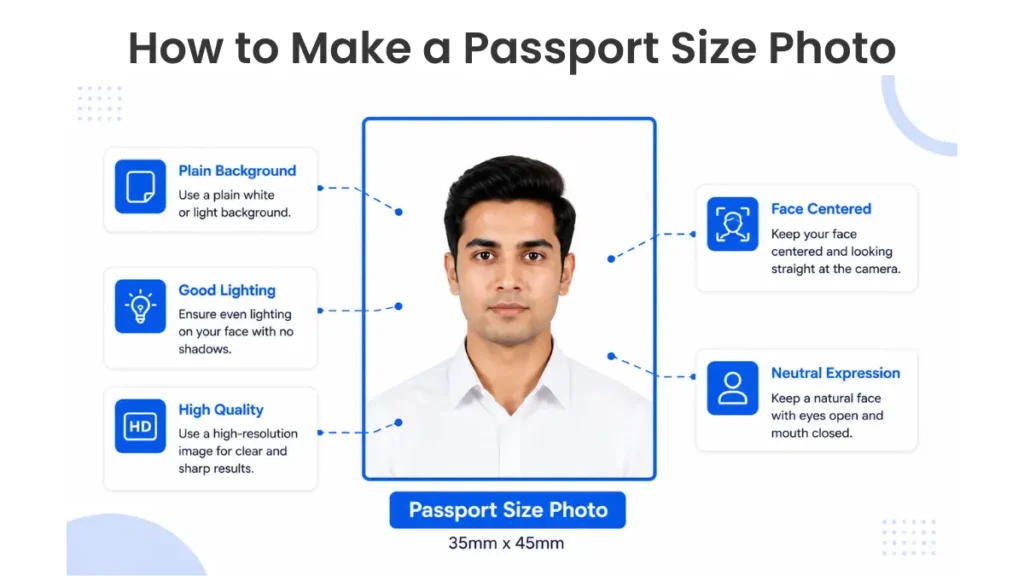
How to Make a Passport Size Photo: The Basics
A few basics matter no matter which tool you use. Keep the background plain, white or light grey works for most Indian forms. Make sure your full face is visible, no sunglasses, no cap, even lighting, neutral expression. A good passport photo size maker free option online walks you through all of this, no installation needed.
Printing physical copies? Always print at 100% scale. Don’t let your printer auto “fit to page,” since that quietly shrinks the photo below size. Some print shops and tools can also arrange several copies onto one 4×6 inch or A4 sheet. That saves money if you need a few prints.
Common photo sizes for Indian forms
| Purpose | Size | Background |
|---|---|---|
| Indian Passport | 2 x 2 inches | White |
| SSC / UPSC / IBPS exams | 3.5 x 4.5 cm | White or light background |
| PAN Card | 2.5 x 3.5 cm | White |
| US Visa | 2 x 2 inches | White |
| Schengen Visa | 3.5 x 4.5 cm | Light grey or white |
These numbers change from time to time, so always cross-check with the official form before you submit.
Common Passport Photo Mistakes to Avoid
People get their applications rejected over small, avoidable errors more often than you’d think. The most common one? Submitting a photo in the wrong size, guessed or copied straight from an old application. Poor lighting is another big one. A photo shot indoors under yellow bulbs often looks too dark or picks up an odd color tint. A busy background, a poster, furniture, anything behind you, is an instant red flag for most government offices.
Smiling too much causes trouble too, since many passport and visa photos require a neutral expression with your mouth closed. Sunglasses, caps, and hair falling across your face are also common reasons photos bounce back. Prescription glasses are trickier than people expect. The US and most EU nations don’t allow glasses in official photos at all. India, the UK, and Canada allow them, as long as there’s no glare on the lenses. Low-resolution images, usually from an old phone or a screenshot, come out blurry once printed.
Plenty of people crop their photo wrong too, cutting off the chin or leaving too much space above the head. One catch worth knowing: some places, Canada included, require a professionally taken photo rather than a self-taken one. A DIY tool won’t cut it everywhere. Before you upload anything, check the exact requirements on the official government portal you’re submitting to.
Choosing the Best Passport Photo Maker Online
There are many passport photo tools available and, to be honest, not all of them are of equal quality. Your face is detected and the frame is adjusted, saving time with automatic crop. No guess work. A passport photo maker AI feature takes this further, using face detection to center your head on its own. Less trial and error for you. Background adjustment helps too, if your original photo has clutter behind you, since a good tool swaps it out instantly.
Look for one with templates for multiple countries and Indian exam formats. Photo size passport requirements really do vary a lot between a passport, a PAN card, and an SSC exam form. Mobile-friendly design matters too, since plenty of people fill these forms out from their phone. Cyber café or home, doesn’t matter. Instant preview lets you check your photo before downloading, so you’re not left guessing whether it’ll pass.
A high-quality download option matters too. A blurry or over-compressed file defeats the whole purpose. Most importantly, stick with a free tool that doesn’t ask for card details or keep your photo afterward. Privacy actually matters here, since you’re uploading identity documents for something like a government exam or a passport application. A tool that processes everything on-device, no upload to a server at all, is the safest bet.
FAQ
How can I make a passport size photo online?
Upload your photo to any passport size photo maker, crop it to the required dimensions, adjust the background, and download the finished file. It works the same way for a passport form, an SSC exam form, or a college admission upload.
Is there a free passport photo maker?
Yes, several tools online let you create and download a passport photo size maker free version without any payment or signup, which is useful when you’re filling out multiple government forms back to back.
What size should a passport photo be?
It depends on the form. Indian passports usually require 2×2 inches, and many exam and visa forms ask for 35x45mm. Always check the instructions on the form itself before uploading.
Can AI create a passport photo?
Yes, there are tools that use AI-powered face detection to automatically crop and center your photo correctly, reducing manual adjustments and the chance of rejection.
Is my passport photo free to download?
Most of the online tools provide you with an option to download a passport photo maker for free, with which you can save the final photo without any cost. This is important when you are applying for exams like SSC or UPSC in a deadline.
Do I need a plain white background for every country?
No. White is most commonly required, but some countries will accept light grey or off white. Always check the particular background colour before you upload.
Pixaru
Our Related Helpful Tools