
JPG to PDF 300 KB: Convert JPG to PDF Online Free
Converting JPG to PDF 300 KB is something almost every student and job seeker in India runs into eventually. You’ve filled out the form and uploaded your documents. Then the portal throws an error: “File size must not exceed 300 KB.” It’s frustrating, especially when your phone camera or scanner spits out a JPG three or four times that size. Government job applications, university admission portals, and scholarship forms are notorious for this.
Most of them want your signature, photo, or mark sheet as a PDF. The cap usually sits somewhere between 100 KB and 1 MB. A JPG to PDF converter built for this exact problem saves you the headache of guessing at settings. You upload your JPG, and the tool hands back a clean PDF close to what the form needs.
JPG to PDF Converter
Combine JPG, PNG and WEBP images into a single PDF instantly. Everything happens inside your browser. No uploads. 100% private.
Drag & drop images here
or click to browse — you can also paste an image with Ctrl/Cmd + V
Supports JPG, JPEG, PNG, WEBP · Max 25MB per file
PDF Settings
Left = highest quality, right = smallest PDF file size.
Orientation is auto-corrected automatically for every image.
Selected Images 0
Drag rows to reorder — this sets the page order in the PDF.
Building PDF…
Summary
Your PDF
What Is a JPG to PDF 300 KB Converter?
A JPG to PDF 300 KB converter takes your image file and does two things at once. It converts the format from JPG to PDF, and it optimizes the file so the final document lands close to the 300 KB mark. That second part matters more than people realize. A regular JPG to PDF conversion, without any size control, often produces a file that’s way too big for the form you’re trying to submit.
Government and university portals set a 300 KB limit for a few practical reasons. It keeps their servers from getting overloaded with thousands of heavy uploads, it speeds up processing on their end, and it forces applicants to submit reasonably clear, non-bloated scans rather than massive raw camera files.
Converting JPG images into a PDF instead of uploading them directly also matters because most official forms specifically ask for a PDF, not an image file, particularly for documents like mark sheets, certificates, or signed declarations.
How to Convert JPG to PDF 300 KB Online
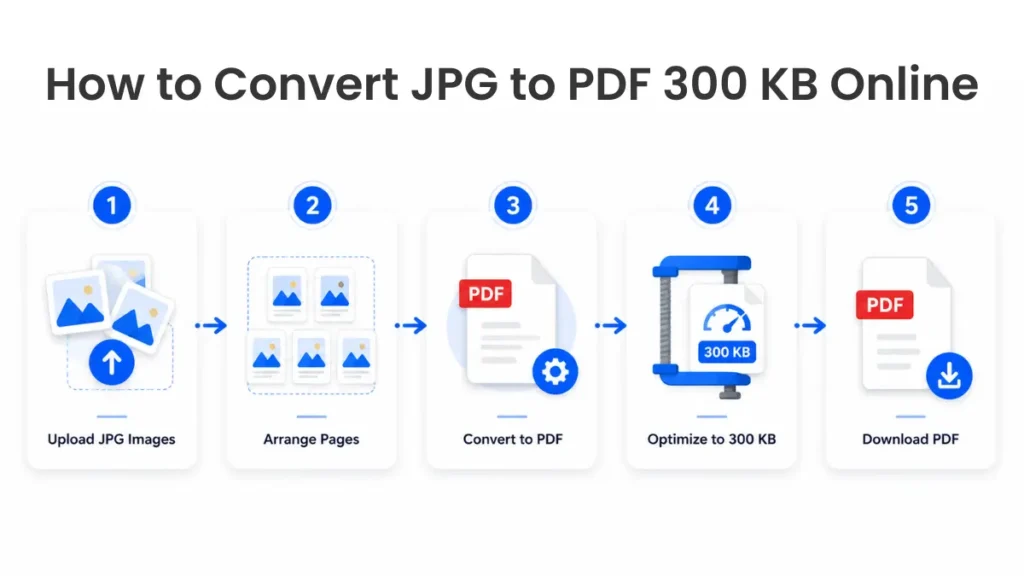
The process is short, and you don’t need any software installed on your computer. Here is the regular process:
- Upload your JPG images. Drag and drop the file or select it from your phone gallery if you are on mobile.
- Arrange the pages. If you are creating one PDF from many images, order the images in the sequence you want them to appear.
- Convert to PDF. The tool merges your JPG file (or files) into one PDF document.
- Optimize to around 300 KB. This step compresses the file without making the text or photo unreadable, so it remains close to the size your form is asking for.
- Download the file. Save it directly to your device, ready to upload.
Tools like this are typically mobile-compatible, so you can convert a photo of your mark sheet straight from your phone while sitting in a cyber café or at home. They’re also free, and most don’t ask you to create an account or log in with your email. That matters when you’re in a hurry to submit a form before a deadline and don’t want to waste time on registration screens.
Why This Tool Works Well When You’re on a Deadline
This kind of tool is usually mobile-friendly. You can convert a photo of your mark sheet straight from your phone. That works at a cyber cafe or at home. Most don’t ask you to sign up or log in, which matters when you’re racing a deadline.
There’s another difference worth knowing. Tools like duplichecker, Smallpdf, and 11zon upload your file to their servers. They delete it later, usually after one to two hours. A converter that runs entirely on-device skips that step. Your file never leaves your browser, so nothing sits on a server at all, even briefly. For a signed document or ID scan, that’s a real advantage, not just a marketing line.
When Do You Need a JPG to PDF 300 KB File?
This size requirement shows up more often than people expect, especially across Indian government and education platforms. You will see the exact size range in almost all the government job applications like SSC, UPSC or state level recruitment forms. That usually covers photo, signature, and certificate uploads. University admission forms follow a similar pattern, especially during online counselling. Mark sheets and category certificates typically need to go in as PDF.
Scholarship portals, both government and private, tend to have tight limits, since they process thousands of applications at once. KYC updates for banking or government schemes sometimes ask for scanned ID proof under a specific size too.
General document submission often comes with the same restriction. That includes job portals, internships, and admit card correction requests. In nearly all these cases, a JPG to PDF document converter that handles the size limit for you removes one more thing to worry about before a deadline.
Different JPG to PDF Size Requirements
Not every form asks for 300 KB. Depending on where you’re submitting, the limit can range anywhere from 100 KB to 2 MB, so it helps to know what each size is typically used for.
JPG to PDF 100 KB
This is one of the tightest limits you’ll come across, usually reserved for passport-style photos or signature uploads on exam forms. A JPG to PDF 100 KB file works well for small, simple documents where detail doesn’t need to be sharp, like a scanned signature.
JPG to PDF 150 KB
A JPG to PDF 150 KB file gives you a little more room while still staying light. This size is common for ID proof uploads or smaller supporting documents on recruitment portals.
JPG to PDF 300 KB
This is the middle ground, and probably the most requested size across Indian portals. A JPG to PDF 300 KB file is usually big enough to keep a mark sheet or certificate legible while still meeting stricter upload caps.
JPG to PDF 500KB
A JPG to PDF 500 KB file suits documents with more text or detail, like a detailed certificate or a multi-line address proof, where you need the content to stay sharp after conversion.
JPG to PDF 1 MB
A JPG to PDF 1 mb is a common file for portals with minimal restrictions, usually used for resumes, cover letters, or scanned documents containing several parts that must remain readable.
JPG to PDF 2MB
A JPG to PDF 2mb file gives you the most flexibility. It is what is usually accepted by platforms that do not compress uploads server-side. Or if you need to upload documents that require image quality, such as scanned property papers or detailed reports.
| Requirement | Typical Use |
|---|---|
| 100 KB | Signature, passport photo |
| 150 KB | ID proof, small supporting docs |
| 300 KB | Mark sheets, certificates |
| 500 KB | Detailed certificates, address proof |
| 1 MB | Resumes, multi-section documents |
| 2 MB | Scanned reports, property papers |
These are general rules, not hard and fast, so always check the particular form before you upload anything.
Why Some Photos Compress Better Than Others
Two photos of the exact same size can behave very differently once you try to shrink them. Smooth, flat areas like sky, plain walls, or blank paper compress easily. Busy textures like fabric, grass, or fine print take up far more space for the same visual detail. Dark indoor shots carry hidden grain and noise. That quietly eats into your size budget, even when the photo looks fine on screen.
This is also why some source images convert almost instantly while others fight you the whole way. A photo sent through WhatsApp is already compressed once. It converts easily and rarely strains a 300 KB target. Screenshots are even lighter, since flat, plain-colored screens compress very well. A raw photo straight off your phone’s camera is the heavy one here. A single 4 MB camera shot can eat most of your entire size budget on its own.
Page orientation plays a small role too. Portrait pages tend to stack more efficiently inside a PDF than wide, landscape ones do.
JPG to PDF 300 KB vs 11zon JPG to PDF
Both a dedicated JPG to PDF 300 KB tool and 11zon’s JPG to PDF tool do the same basic job. They turn your image into a properly sized PDF. The real difference is control. A converter built around the 300 KB target aims the compression at that number directly.
11zon works differently. It gives you a quality slider, set to 70% by default. You adjust it yourself after conversion to hit roughly the size you want. That’s more manual, and it can mean some trial and error if you need something close to an exact number. A size-targeted tool skips that guesswork entirely.
11zon also offers a much wider toolkit beyond size-based conversion, including general PDF editing and format conversion. That suits people who need more than a one-off conversion. If you’re just trying to hit 300 KB, a tool built around that number gets you there faster.
Tips for Getting a PDF Close to 300 KB
A few small habits make a real difference in how close your final file lands to the target. Start with a clear but reasonably sized JPG, not a massive, unedited camera photo. Most phone cameras produce images well over 2 MB. Starting that large means heavier compression later, which can hurt clarity.
Crop out unnecessary borders or background before converting. Extra space in the frame adds file size without adding anything useful. A well-lit, properly framed photo compresses more cleanly than a badly cropped or blurry one. Get the shot right the first time if you can.
Only compress as much as you actually need to. Squeezing a file down further than required can blur text or make a signature hard to read. That sometimes gets a document rejected even though it technically meets the size limit. Documents like mark sheets and forms are mostly flat text. They don’t need nearly as much compression as a detailed photo does.
Always check readability before you upload anything. Open the final PDF and zoom in on the text or photo. A file that’s the right size but impossible to read defeats the whole purpose.
FAQ
How do I convert JPG to PDF 300 KB?
Upload your JPG image to a converter, let it merge and compress the file, and download the finished PDF once it’s optimized close to 300 KB.
Can I create a PDF exactly 300 KB?
Most tools get you very close to 300 KB, though the exact final size can vary slightly depending on the image content and how much detail it holds.
Is this converter free?
Yes, most of the JPG to PDF tools that are built for this task are free to use and don’t require payment or a subscription.
Does it work on mobile?
Yes, these converters are generally mobile-compatible, so you can upload and convert a photo taken directly from your phone.
Can I combine multiple JPG images?
Yes, many converters allow you to upload several JPG files and combine them into one multi-page PDF.
Is my uploaded file secure?
Reliable converters process your file for the conversion and don’t store it permanently, though it’s always worth checking a tool’s privacy policy before uploading sensitive documents.
How can I reduce a PDF larger than 300 KB?
Re-upload the JPG version if you have it and run it through a size-targeted converter, or compress the existing PDF using a PDF compression tool set to your target size.
Can I convert JPG to PDF without losing quality?
You can keep quality close to the original if you avoid over-compressing. Aim for the smallest file size that still keeps your document clearly readable, rather than compressing more than the form actually requires.
Does a WhatsApp photo or screenshot convert differently than a camera photo?
Yes, WhatsApp photos and screenshots are already lighter, so they compress and convert faster than a raw camera shot.
Conclusion
Getting a JPG to PDF 300 KB file right the first time saves you from rejected applications and repeated re-uploads. Whether you’re submitting a mark sheet for a government job, a certificate for a scholarship, or a signature for an admission form, a quick, free converter handles the size and format work for you. Pick clear images to start with, compress only as much as needed, and you’ll have a properly sized PDF ready to upload in under a minute.
PIXARU
Our Related Helpful Tools