
Signature resize is something almost everyone runs into sooner or later. It usually happens right when a form is due in an hour. Government portals, banking websites, job application forms, and college admission systems all ask for a scanned signature. Almost all of them reject the file the first time. The image looks fine on your phone, but the portal says it’s too big, too small, or the wrong format.
This guide walks through what that actually means and why size limits exist. It also covers how to shrink your signature online without turning it into a blurry mess. By the end, you’ll know how to handle signature resize online. You’ll get your form submitted on the first try.
Short answer for SSC forms: use a JPG of 10 to 20 KB. Make it about 6 cm wide and 2 cm high. Older notices listed 4 cm × 2 cm, so read your own notification before you upload.
Signature Resize
Resize your signature to an exact size and target KB. Runs in your browser — no uploads, 100% private.
Drag & drop your signature here
or click to browse — you can also paste an image with Ctrl/Cmd + V
Supports JPG, JPEG, PNG, WEBP · Max 25MB per file
Selected Signatures 0
Resize Settings
= 276 × 118 px
Your signature is stretched to fit these exact dimensions, as most forms require.
Resizing…
Summary
Results
Crop Signature
Drag the corners to select the area you want to keep, then apply.
How to Resize Signature in 3 Steps
Step 1: Upload your signature
Drag your signature into the box, or tap Choose Signature Image. You can also paste an image with Ctrl or Cmd + V. The tool takes JPG, JPEG, PNG and WEBP files up to 25 MB each.
Step 2: Set the size and target KB
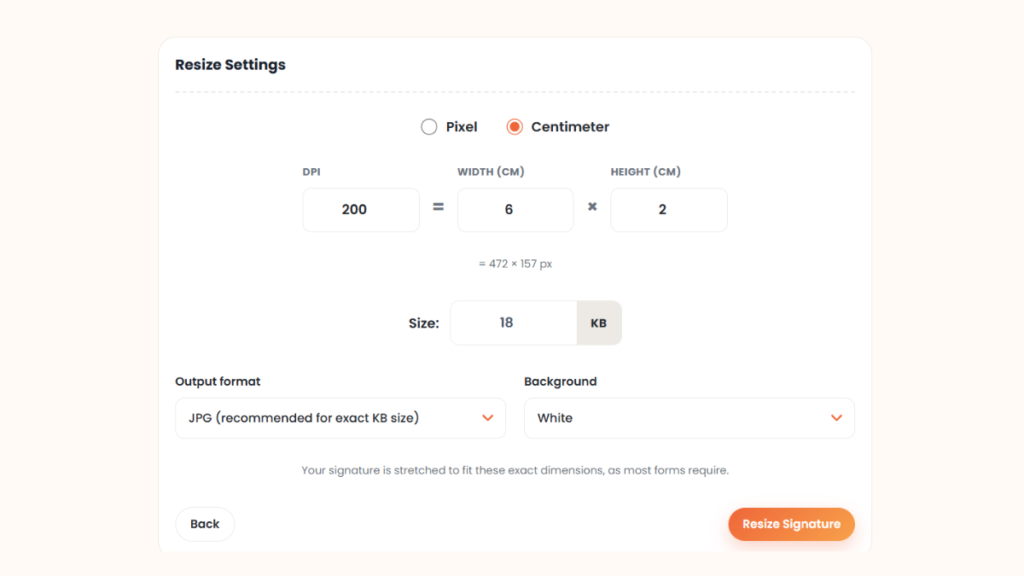
Open Resize Settings. Choose Pixel or Centimeter. Enter the DPI, then the width and height your form asks for. The tool shows the pixel size under the boxes. Enter a target in the Size box, in KB. For a 10 to 20 KB limit, try 18 KB. Keep the JPG output and the white background, then click Resize Signature.
Step 3: Check the preview and download
Zoom in on the preview. Every stroke should stay readable. The result card shows the file size, the target, the dimensions and the format. If the file is over the limit, lower the target by a few KB and run it again. Click Download, then open the file once before you upload it.
What Signature Resize Means
Signature resize means changing how much space your signature image takes up. That can mean pixel dimensions, file size, or both. These are two different things, and mixing them up is where most people get stuck. Dimensions are width and height, measured in pixels or centimeters. File size is how many kilobytes the image takes up on disk. A small-looking signature can still be 500 KB. A large-looking one can be only 15 KB, depending on compression.
Most forms care about file size, not just appearance. Servers need to store thousands of these files without running out of space. That’s why signature resize in KB matters more than resizing in inches or cm alone. Format plays a role too. JPG and JPEG compress well and are usually preferred. PNG keeps sharper edges but produces larger files for the same quality.
Signature Size Requirements by Exam
Different exam boards ask for different numbers, and mixing them up is one of the easiest ways to get rejected. Here’s a general reference for common Indian exams, though you should always confirm the exact figure on your specific notification.
| Exam | Signature Size | Dimensions | Checked in October 2026 |
|---|---|---|---|
| SSC (CGL, CHSL, etc.) | 10–20 KB, JPG | About 6 × 2 cm (older notices: 4 × 2 cm) | Yes, in prep guides |
| UPSC | 20–100 KB in recent guides, JPG | 350–500 px | Yes, in prep guides |
| Railway (RRB / RRC) | 10–20 KB | Check your notice | No |
| Banking (IBPS / SBI / RBI) | 10–20 KB | Check your notice | No |
| GATE | Under 10 KB | Check your notice | No |
| CET | 10–20 KB | Check your notice | No |
| Police recruitment | 10–20 KB | Check your notice | No |
Many guides list 3.5 × 4.5 cm for the photo, not the signature. Keep the two sizes apart. These figures shift with each notification cycle, sometimes without much notice. Treat this table as a starting point, not a final answer. Check the actual notification before you submit anything.
Signature Resize for SSC: 10 to 20 KB and 6 cm × 2 cm
SSC is the biggest source of signature resize searches, and most rejections come from one of two slips. The file is over 20 KB, or the shape is wrong. Recent SSC guides list a JPG of 10 to 20 KB, about 6 cm wide and 2 cm high. Older notices used 4 cm × 2 cm.
Here is a setup that works for the 6 cm size. Set the width to 6cm x 2cm in the tool. Choose 200 DPI, which gives about 472 × 157 pixels. Enter 15 to 18 KB as the target. An ssc signature resizer must do both jobs, because the portal checks size and file weight separately.
Crop your signature to a wide shape first. The 6 × 2 box is 3 times wider than it is tall. A square signature gets stretched or shrinks to a tiny mark inside the box. If you need a fresh signature on clean paper, you can also create one with our free signature maker. Most forms ask for a photo too, and its size rules differ from the signature. Our passport size photo maker handles that part.
My Test: Signature Resize for an SSC Form
I tested the tool with a sample signature saved as a PNG. I chose Centimeter and set 200 DPI, 6 cm wide and 2 cm high. I entered 18 KB as the size and kept JPG with a white background.
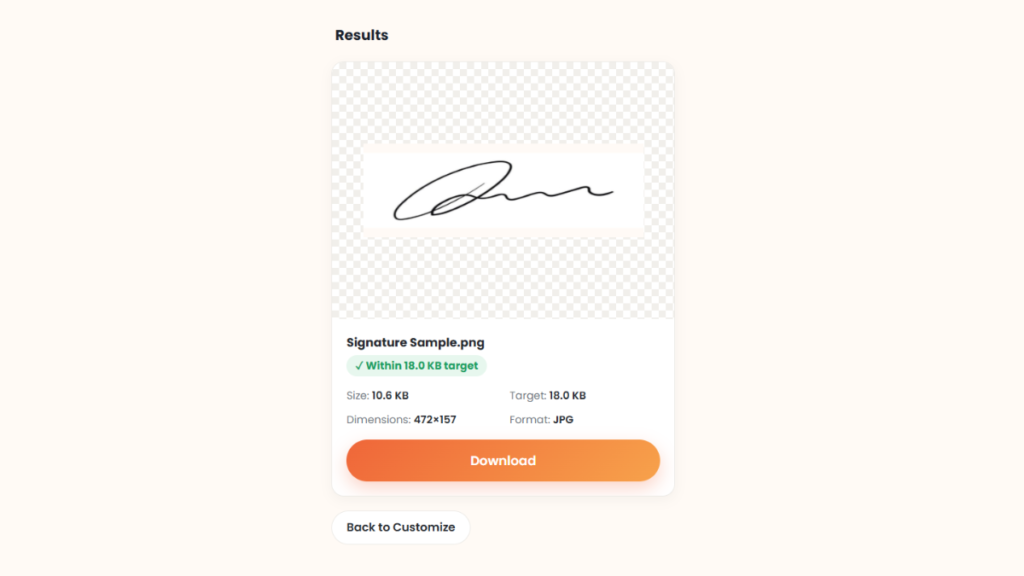
The tool showed 472 × 157 px under the boxes, which matches the table below. The result was a JPG of 472 × 157 px and 10.6 KB. The tool marked it “Within 18.0 KB target.”
That file sits under the 18 KB target. It also stays above the 10 KB minimum of a 10 to 20 KB range. A simple signature on a white page needs few KB, so the result can land well below your target. Check it against the minimum as well as the maximum. Your own file will differ.
Signature Resize 10 to 20 KB and Exactly 20 KB
Two limits cause most of the confusion. One is a range, such as 10 to 20 KB. The other is a single maximum, such as 20 KB. Both fail if you aim for the edge.
For a 10 to 20 KB range, aim for 15 to 18 KB. For a maximum of 20 KB, aim for about 18 KB. That small gap protects you if the portal counts 1 KB as 1,000 bytes and your computer counts 1,024. Our MB to KB converter shows both counts side by side.
Example: a phone photo of a signature can be 2 MB. That is 2,048 KB, so reaching 18 KB means a file about 99 percent smaller. If the tool will not reach your target, crop the white space first, then save as JPG. Lower the pixel size if the form allows it.
Fixing “Signature Must Be at Least 300px Width and 100px Height”
Some portals reject a signature with the message “signature must be at least 300px width and 100px height. Your file is 230px × 75px.” Read it closely. Your image is too small, not too large. Making it smaller will not help.
Take the larger of two numbers: 300 divided by your width, and 100 divided by your height. Multiply both sides by that number. Use the 230×75 px file from the message For width you need to be 300 ÷ 230 = ~1.30 times larger. which means the height needs to be ~1.334 bigger (100/75) Use the bigger number, so both sides pass. Height 75 × 1.334 gives 100 px. Width 230 × 1.334 gives about 307 px. The new size is 307 × 100 px. The table shows three sizes people report on this error.
| Your file | Minimum | Set it to |
|---|---|---|
| 230 × 75 px | 300 × 100 px | 307 × 100 px |
| 275 × 115 px | 300 × 100 px | 300 × 125 px |
| 276 × 118 px | 300 × 100 px | 300 × 128 px |
Stretching a very small image makes it soft. If the result looks blurry, take a new photo closer to the page or scan at a higher setting. Crop the empty space too. Some portals set a maximum size as well, so read both limits on your form. The numbers belong to the portal that shows the message, so follow the message you see.
Signature Size Converter: cm to Pixels
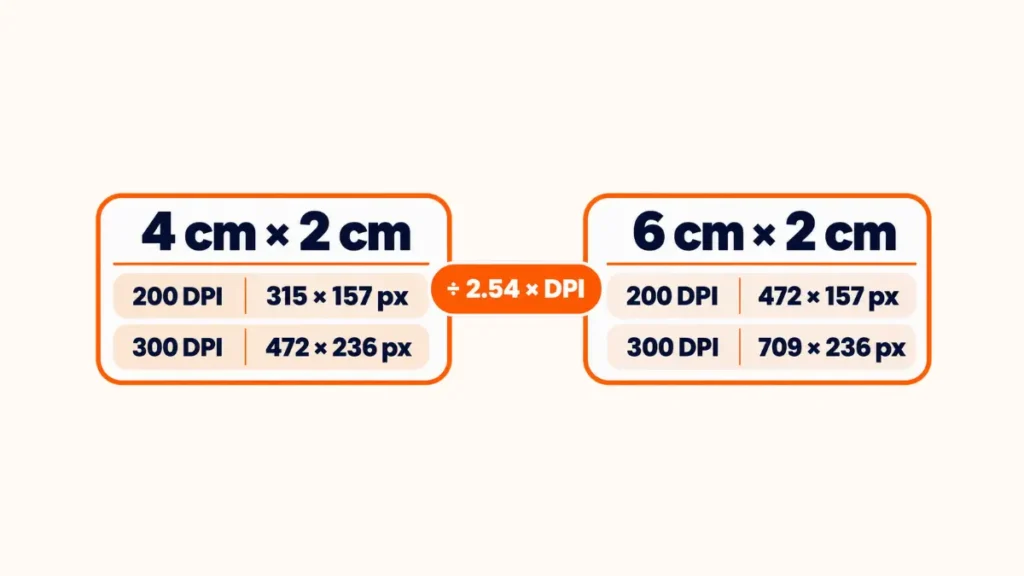
Forms often give centimeters while the upload checks pixels. The formula is simple. Pixels equal centimeters divided by 2.54, multiplied by your DPI. If a form asks for a set DPI, use our DPI converter after you resize.
| Size | At 200 DPI | At 300 DPI |
|---|---|---|
| 4 cm × 2 cm | 315 × 157 px | 472 × 236 px |
| 6 cm × 2 cm | 472 × 157 px | 709 × 236 px |
When You Need to Resize Your Signature in KB
You’ll bump into this requirement more often than you’d expect. Government application forms, passport applications, and banking KYC updates almost always specify an exact size range. GATE, NTPC, and other competitive exam portals do the same, and so does most digital document signing software.
The actual numbers vary a lot from one portal to another. Some ask for as little as 10 KB. Others want 20 KB, 30 KB, 50 KB, or even up to 100 KB. A passport form might cap you at 20 KB. A banking portal might accept up to 50 KB for the same type of document. This is exactly why signature resize online tools are useful. Instead of guessing, you upload once, adjust the target size, and download a matching file.
File size distribution across common portals (visual guide):
10 KB Exam forms 20 KB Passport / KYC 30 KB Scholarships 50 KB Banking
Because the limits differ so much, always check the exact number printed on your form. Don’t assume one size fits every portal.
How to Resize a Signature Without Losing Quality
Start with a clean scan or a clear photo taken in good light, on a plain white background. A shaky, shadowed photo looks worse no matter how much you compress it later. This first step matters more than people think.
Next, crop out the empty space around the signature. A tightly cropped image looks sharper and compresses smaller naturally, before you even touch any settings. Choose JPG when the form allows it. JPG handles compression better than PNG for handwritten signatures on a plain background.
From there, compress gradually instead of dragging the quality slider straight to the bottom. Reduce it a little, check the preview, and repeat. Keep going until the signature is still readable and the file fits the limit. Many official instructions give a range such as 10 to 20 KB. The lower limit stops over-compressed, blurry signatures from being accepted. Don’t assume smaller is always better. Avoid stretching the image to fit a box, since that distorts the signature’s proportions. The tool stretches your signature to the exact size you enter, so crop it to the same shape first.
If you have a fixed cm or mm requirement, like 6 × 2 cm, set your DPI correctly first. Many exam portals ask for 200 DPI, and print-quality documents often ask for 300 DPI. Getting the DPI wrong is a common reason a signature that looks fine on screen prints or scans incorrectly.
Resize Signature on Your Phone
Most applicants use a phone, and that works fine. Sign with a dark pen on plain white paper. Take the photo in daylight, with the phone held flat above the page. Open the tool in your phone browser, tap Choose Signature Image, set the size and KB, and download.
Keep the original photo until the portal accepts your upload. If a portal rejects the file, you can resize again from the original instead of compressing a compressed copy.
Common Signature Upload Mistakes to Avoid
Most rejected uploads come down to the same handful of mistakes. A blurry signature from a low-light photo is the most common one. Wrong dimensions that don’t match the form come next. Uploading a PNG when JPG was required, or the other way around, is another frequent issue.
Background shadows from scanning on a dark surface cause problems too. So does a signature cropped too small to read, or one rotated slightly sideways. On the opposite end, excessive compression can make a signature blurry enough to get flagged manually. Oversized files simply won’t upload at all.
It’s worth repeating: many portals set a range such as 10 to 20 KB. Others use a completely different range. Always read the upload instructions on the actual form before submitting. Assuming a fixed number across different portals is one of the most avoidable mistakes applicants make.
Resizing Multiple Signatures at Once
If you’re a CSC operator or filling several forms at once, resizing one file at a time gets old fast. A signature resize tool that supports batch uploads lets you process several signatures together. You can download them all as one ZIP file. That’s a real time saver compared to repeating the same steps over and over for each individual application.
Why Processing On Your Device Matters
Many online signature resizers upload your file to a server and process it there. They delete it after a set window, usually somewhere between 25 minutes and a couple of hours. Retention windows differ by tool, so read each privacy page. That’s fine for most casual uploads, but a signature is a sensitive document. It’s tied to your identity on official paperwork.
A tool that runs entirely inside your browser skips that step completely. Your signature never leaves your device, so nothing sits on a server, not even briefly. For something you’re attaching to a government form or KYC update, that’s a real difference, not just marketing.
Choosing the Right Online Tool for Signature Resize
A good tool for signature resize should process your file securely. It shouldn’t store copies of a personal document like your signature. It should compress quickly, skip watermarks, and work just as well on a phone browser as on a desktop.
Look for a tool with an exact KB target, not just “small, medium, large,” since forms usually specify a number. A live preview before downloading saves you from re-uploading the same file five times. Being able to download the result more than once, without extra charges, matters too. So does using the tool for free. Some tools paywall downloads after your first file. A genuinely free option shouldn’t. A reliable signature resize in KB tool with these features makes a frustrating task take under a minute.
Quick Answers Before You Start
How can I resize my signature online?
Upload your scanned or photographed signature to a free online tool. Set your target file size. Download the compressed version once the preview looks clear.
What is the SSC signature size?
Recent SSC guides list a JPG of 10 to 20 KB, about 6 cm wide and 2 cm high. Older notices used 4 cm × 2 cm. Confirm on your notification.
What is a signature size converter?
It’s a tool that switches your signature’s measurement between pixels, centimeters, and KB file size, matching whatever a form requires.
Can I resize my signature to exactly 20 KB?
Yes, you can set 20 KB as the target. The tool gets the file within it, and the file can come out smaller. Aim for about 18 KB, and check that the result stays above any minimum.
Why does the portal say my signature must be at least 300px width and 100px height?
Your image is smaller than the portal’s minimum. Make it larger, keeping its shape. A 230 × 75 px file becomes about 307 × 100 px.
Will resizing reduce quality?
There’s always some quality loss with compression. Adjust it a bit at a time. Stop when the signature is readable and still meets the size requirements.
What format is best?
Use JPG. A signature on plain white paper shrinks to a few KB as a JPG, and the pen strokes stay readable.
How do I convert my signature size to centimeters?
Switch the unit setting from pixels to centimeters before you resize. The tool handles the conversion using your chosen DPI.
Can I resize my signature on my phone?
Yes. The tool runs in a phone browser. Photograph the signature flat in daylight, then upload it.
Can you resize online signatures safely?
Yes, provided you use a tool that is safe and doesn’t keep your personal documents after conversion. This tool runs in your browser, so your file stays on your device.
Conclusion
Getting your signature size right saves you from repeated form rejections and last-minute stress. Always check the exact upload requirement on the portal you’re using. Limits range from 10 KB to 100 KB depending on the form. A reliable, free signature resize online tool lets you crop, compress, and download a sized file in under a minute. You need no design software.
A new notification can change the size. Before you submit, compare your file with the numbers on that portal’s upload page.