
An experience calculator tells you how long you have worked, in years, months and days, from your joining date and your leaving date. Enter the two dates, click Calculate experience and you also get the total in months, weeks and days. Joining on 7 August 2005 and leaving on 7 November 2026 gives 21 years, 3 months and 1 day.
Experience Calculator
Find your total work experience in years, months and days. Add one job or many, merge overlapping dates and spot career gaps.
Months are counted by calendar. When several jobs are added, their years, months and days are summed and 30 days count as one month.
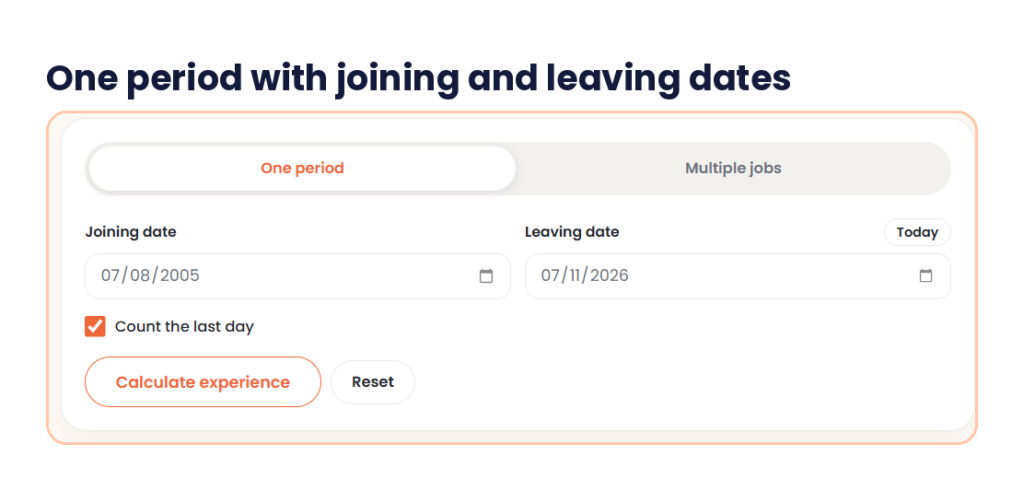
This experience calculator has two tabs: One period and Multiple jobs. One period asks for a Joining date and a Leaving date. A Today button fills the leaving date, and a Count the last day checkbox is switched on by default. Click Calculate experience and the result shows Years, Months and Days in three boxes, then Total months, Total days, Total weeks and In years.
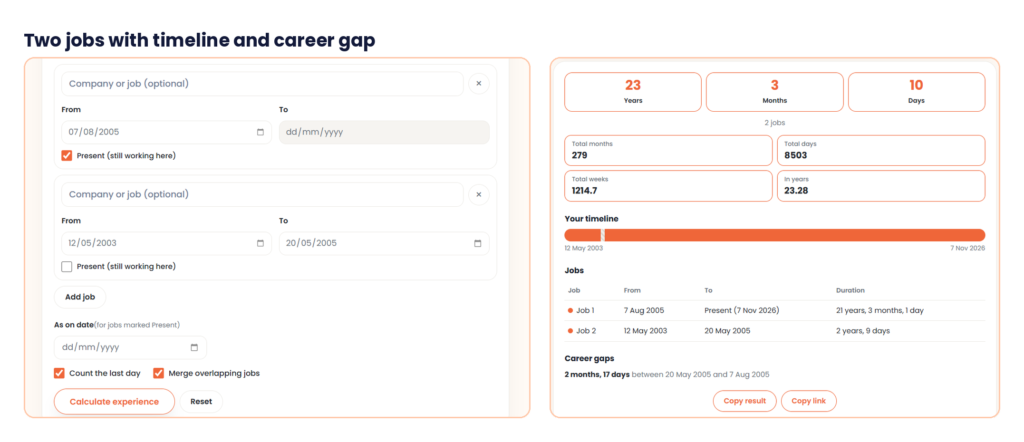
Multiple jobs gives you one card per job, with an optional Company or job name, a From date, a To date and a Present (still working here) checkbox. Add job adds a card. An As on date box is for jobs marked Present. Two checkboxes, Count the last day and Merge overlapping jobs, control the sum. The result adds a Your timeline bar, a Jobs table and Career gaps. Copy result and Copy link share the answer, and Reset clears the form.
What is an experience calculator?
An experience calculator is a date calculator for your career. You give it a start date and an end date, and it works out the time between them in years, months and days. It saves you from borrowing days and months by hand, which is where most mistakes happen.
You may also see it called a work experience calculator, a total experience calculator, an online experience calculator or an online work experience calculator. Some people type exp calculator or experience cal in a hurry. The job is the same. You can use this experience calculator online from a phone or a computer, with nothing to install. Use it for a resume, a job form, a salary talk or a quick check before an interview.
How to calculate years of experience
To calculate work experience by hand, subtract the joining date from the leaving date, and then decide whether the last day counts.
- Write the joining date and the leaving date.
- Subtract the years, then the months, then the days.
- If the days are negative, borrow one month and add the number of days in the month before the leaving month.
- If the months are negative, borrow one year and add 12 months.
- If you count the last working day, add 1 day.
Take someone who joined on 25 January 2019 and left on 10 April 2023. Years: 2023 − 2019 = 4. Months: 4 − 1 = 3. Days: 10 − 25 = −15. The days are negative, so borrow a month. Months become 2, and days become −15 + 31 = 16, because March has 31 days. Add 1 for the last day, and the answer is 4 years, 2 months and 17 days. The calendar check agrees: 25 January 2019 plus 4 years and 2 months is 25 March 2023, and 25 March to 10 April, counting the last day, is 17 days.
That is the formula behind every experience calculator. If you use a work experience calculator, you only type the dates.
How to use the experience calculator in 3 steps
It runs on the page and needs no account. A result takes a few seconds.
Step 1: Enter your joining and leaving dates
Open One period. Type your Joining date and your Leaving date, or tap Today if you still work there. The dates use day, month and year. Leave Count the last day ticked if your last working day should count as a day worked.
Step 2: Click Calculate experience
Click Calculate experience. Three boxes show Years, Months and Days. Under them, a line repeats your dates, such as 7 Aug 2005 to 7 Nov 2026 (last day counted). Four more boxes show Total months, Total days, Total weeks and In years.

Step 3: Use Multiple jobs for more than one employer
Open Multiple jobs. Add a company name if you want, then enter From and To for each job. Tick Present (still working here) for a current job. Click Add job for more rows. Leave As on date empty to count a current job up to today, or fill it for a cut-off date. Then click Calculate experience to see the total, a timeline, a job table and any career gaps.
My test: 7 Aug 2005 to 7 Nov 2026
I opened One period and entered 07/08/2005 as the Joining date and 07/11/2026 as the Leaving date. I kept Count the last day ticked and clicked Calculate experience.
The result was 21 Years, 3 Months and 1 Day. The line under it read 7 Aug 2005 to 7 Nov 2026 (last day counted). Total months was 255, Total days 7763, Total weeks 1109 and In years 21.25.
I checked the experience calculator by hand. 21 years and 3 months is 255 months. Counting 7 August 2005 to 7 November 2026 with the last day gives 7,763 days, and 7,763 ÷ 7 is exactly 1,109 weeks. The In years box matches 7,763 ÷ 365.25 = 21.25. The extra 1 day is the last day.
Then I opened Multiple jobs. Job 1 ran from 07/08/2005 and was marked Present. Job 2 ran from 12/05/2003 to 20/05/2005. I left As on date empty, and kept Count the last day and Merge overlapping jobs ticked.
The total was 23 Years, 3 Months and 10 Days for 2 jobs. Total months was 279, Total days 8503, Total weeks 1214.7 and In years 23.28. The Jobs table showed Job 1 as 21 years, 3 months, 1 day and Job 2 as 2 years, 9 days. Career gaps showed 2 months, 17 days between 20 May 2005 and 7 Aug 2005.
By hand, Job 2 is 2 years and 9 days, which is 740 days. Add the 7,763 days of Job 1 and you get 8,503. The gap is the 78 days from 21 May to 6 August 2005, which is 2 months and 17 days. All of it matches.
Count the last day or not?
This one choice can change the answer in any experience calculator. Take someone who joined on 15 June 2019 and left on 14 June 2024.
| Setting | Result | Total days |
|---|---|---|
| Last day counted | 5 years, 0 months, 0 days | 1,827 |
| Last day not counted | 4 years, 11 months, 30 days | 1,826 |
Your last working day is a day you worked, so counting it is the natural choice, and many HR teams do. Some forms and employers stop a day earlier. Check what your employer or your form uses, and match it.
Experience calculator in years: decimals and months
Many forms ask for experience in years, such as 5.6 years. An experience calculator in years can give this in two ways.
- Months ÷ 12. 21 years and 3 months is 255 months, and 255 ÷ 12 = 21.25.
- Days ÷ 365.25. The 365.25 allows for leap years. The In years box in the test above matches this method.
The two methods agree when the days are zero. They drift apart otherwise. Take 10 February 2018 to 25 September 2023, with the last day counted. That is 5 years, 7 months and 16 days, or 2,054 days. Days ÷ 365.25 gives 5.62 years. Months only, 67 ÷ 12, gives 5.58 years. If a form asks for years to one decimal place, both round to 5.6.
Here is a quick table for the months part.
| Months | As a decimal of a year |
|---|---|
| 1 | 0.08 |
| 2 | 0.17 |
| 3 | 0.25 |
| 4 | 0.33 |
| 5 | 0.42 |
| 6 | 0.50 |
| 7 | 0.58 |
| 8 | 0.67 |
| 9 | 0.75 |
| 10 | 0.83 |
| 11 | 0.92 |
Going the other way, 5.6 years is 5 years and 0.6 × 12 = 7.2 months, so about 5 years and 7 months.
Multiple jobs, overlaps and career gaps
Most people have more than one employer, so a total experience calculator has to add the jobs. There are two traps.
The first is overlap. Say you worked at Company A from 1 January 2019 to 31 December 2021, which is 3 years. You also worked at Company B from 1 July 2021 to 31 December 2022, which is 1 year and 6 months. Added together, that is 4 years and 6 months, or 1,645 days. But the 184 days from July to December 2021 sit in both jobs. Counted once, your experience is 1 January 2019 to 31 December 2022, which is 4 years and 1,461 days. Tick Merge overlapping jobs when two jobs share dates, such as a part-time job next to a full-time one. I did not run an overlap case on the tool, so check an overlap result against a hand calculation like this one.
The second is the gap. A gap between two jobs is not experience, but it is useful to know. The Career gaps line shows the time between jobs, such as 2 months, 17 days. Recruiters often ask about gaps, so know your number before the interview.
Experience as on a date
Job notices often ask for experience as on a fixed date, such as 31 December. That is why the As on date box exists. Fill it for jobs marked Present, and the experience calculator runs to that date, not to today.
Take someone who joined on 1 March 2020 and is still working there. As on 31 December 2026, with the last day counted, they have 6 years and 10 months, or 2,497 days. I worked that one by hand. Check which date your own form uses before you type it.
Where you will use your total experience
- Resume and LinkedIn. A clear line such as 5 years 7 months reads better than a rough guess.
- Application forms. Many forms ask for experience in years and months, or in years to one decimal.
- Salary talks. If you want to see what a raise means in percent, try our percentage increase calculator.
- Gratuity and service benefits. Rules often depend on years of service. The Payment of Gratuity Act, 1972 is commonly summarised as needing five years of continuous service, with a part year over six months treated as a full year in the payout. Check the Act and your employer for the exact rule.
- Interviews. Know your total, your last job and your gaps before you walk in.
What counts as work experience?
An experience calculator counts dates, and it does not judge what deserves to be called experience. Employers, government bodies and universities each set their own rules.
Internships, part-time work, freelance projects, probation and the notice period are treated differently from one place to the next. Unpaid leave and long breaks may or may not count as service. Ask the employer or read the form. Your offer letter and your relieving letter hold the dates that matter, so use them as your source of truth.
Why two experience calculators show different totals
If another work experience calculator online shows a different answer for the same dates, one of these differences is usually the reason.
| Difference | What changes |
|---|---|
| Last day counted or not | 1 day, which can change the months and years |
| Days ÷ 365 or ÷ 365.25 | The decimal years |
| Calendar months or 30-day months | The leftover days |
| Overlaps added or counted once | Several months |
| Working days or calendar days | The total days |
In the checks above, this tool gave calendar-month results with the last day counted by default, and its In years box matched days ÷ 365.25. Compare these settings before you decide that one site is wrong.
How to write experience on a resume
Take the total from the experience calculator, then pick one format and use it everywhere. Write 5 years 7 months, or 5.6 years, or 5+ years. Do not round up to 6 years if the form checks exact dates. A background check may compare your dates with your offer letter and relieving letter, so the dates on your resume should match them.
If you list jobs one by one, add the dates in month and year format. Do not count overlapping jobs twice. Save the finished resume as a PDF so the layout stays fixed. If you only have text, our text to PDF converter can help. Filling a form that asks for a percentage? Our CGPA to percentage calculator is there for that.
For the leap year idea behind 365.25, see this short leap year article.
Common mistakes
These slips affect any experience calculator, so check them first.
- Forgetting that the last day may count. Check your form.
- Adding two overlapping jobs and counting the same months twice.
- Using the notice period or a long break without checking whether it counts.
- Mixing up day and month when typing a date. This tool uses day, month and year.
- Writing 5.7 years when you mean 5 years and 7 months. They are not the same.
- Rounding up in a form that checks exact dates.
- Using dates from memory and not from the offer or relieving letter.
Disclaimer
This experience calculator is a date calculator for general use. It does not decide whether your experience qualifies for a job, a benefit or a visa. Employers, government bodies and universities set their own rules. Check the dates against your offer letter and relieving letter, and confirm the rule with the person or office that will assess it.
Quick answers before you start
How do I calculate work experience?
Subtract the joining date from the leaving date in years, months and days, and decide whether the last day counts. For 25 January 2019 to 10 April 2023 with the last day counted, the answer is 4 years, 2 months and 17 days.
Does the experience calculator count the last day?
Yes, by default. The Count the last day box is ticked. Untick it if your form or employer stops a day earlier.
How do I calculate years of experience as a decimal?
Divide the months by 12, or the days by 365.25. For 21 years and 3 months, both give 21.25. The In years box shows the result.
Can I add more than one job?
Yes. Use Multiple jobs, add a row for each job, and tick Present for a current one. The result shows the total, a timeline, each job and any career gaps.
What if two jobs overlap?
Tick Merge overlapping jobs so shared months are counted once. Otherwise they are added twice.
Is this online experience calculator free?
Yes. It is free and needs no signup.
Open the experience calculator, enter your joining and leaving dates, and read the years, months and days. Then check the total in years against your form, and add each job with the Multiple jobs tab if you have worked in more than one place.