
20 KB Photo Size: Resize Photos Online Free & Fast
Introduction
A 20 KB photo size is what a lot of online forms ask for these days. It catches people off guard almost every time. Phone photos often run several MB, way bigger than what a form will accept. Some portals cap uploads at a strict limit, sometimes exactly 20 KB. This tool lets you upload your photo and shrink it to about 20 KB, no editing software needed. Simple images and signatures usually compress easier than detailed photos.
Compress Photo Under 20KB
Compress your photo under 20KB, 50KB, 100KB or a custom compression level. Everything happens inside your browser. No uploads. 100% private.
Drag & drop images here
or click to browse — you can also paste an image with Ctrl/Cmd + V
Supports JPG, JPEG, PNG, WEBP · Max 25MB per file
Compression Settings
The tool automatically adjusts quality to get as close to 50 KB as possible without going over.
WEBP typically looks noticeably sharper than JPG at the exact same file size, since it's a more efficient format. Use it whenever your form or site accepts WEBP images — switch to JPG only if you specifically need that format.
Removes color before compressing, freeing up your size budget for sharpness instead — turn this on for scanned documents, notes, or handwriting so text stays legible at small KB targets.
Orientation is auto-corrected, unnecessary metadata is always removed, and transparency is preserved automatically whenever the output format supports it. The result is never larger than your original file.
Selected Images 0
Compressing…
Results
Resize Your Photo to 20 KB
Upload your photo and enter 20 KB as your goal size. This tool compresses the image and instantly displays the resulting file size. Preview it and if it looks good, download it. JPG, JPEG, PNG and WebP all work here.
What Does 20 KB Photo Size Mean?
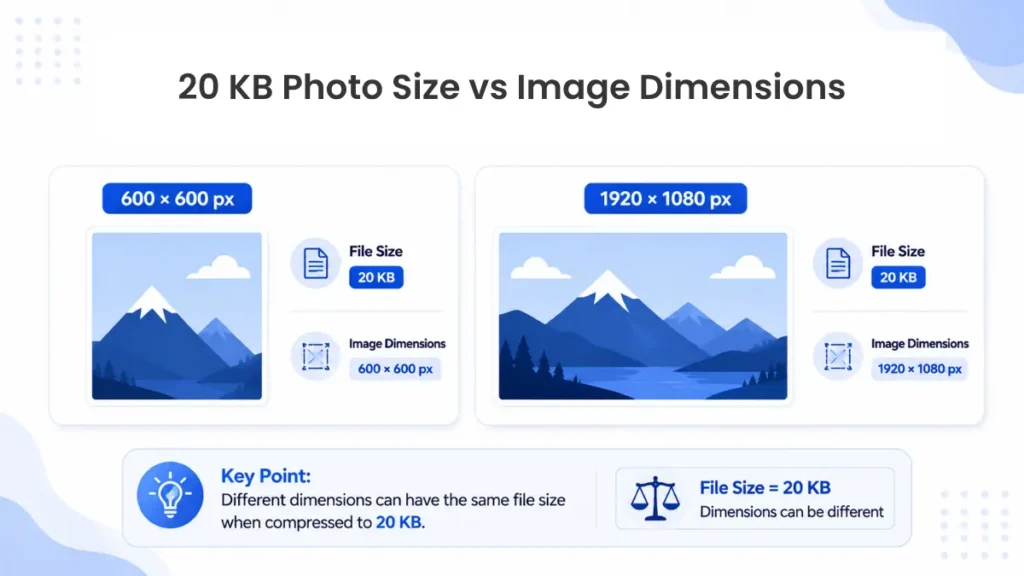
File size and image size aren’t the same thing, although people confuse them all the time. A 20 KB photo size describes the file size rather than the actual size of the image. File size is measured in KB or MB, while dimensions use pixels, like 600 × 600. Two photos can land at nearly the same file size while having completely different pixel dimensions.
Format, compression, colors, and image detail all play a part in that. Here’s something most people don’t realize: the KB measurement itself can shift between systems. Some count 1,000 bytes as a KB, others count 1,024.
How to Resize a Photo to 20 KB
Start by picking your original photo, then upload it and let it load fully. Type in 20 KB as your target, hit compress, and let the tool work through it. It tests different quality levels until it lands close to what you asked for.
Check the final file size and look at the preview. The result might land slightly above or below 20 KB, depending on your image and format. If it looks clear and the size is close enough, download it.
Handling a photo resize to 20 KB this way beats guessing at settings by hand. Aim slightly under 20 KB instead of exactly at the limit. That small buffer helps if a portal calculates file size a bit differently.
How to Compress a Photo to 20 KB
Compression isn’t just shrinking a number on paper, it reduces image data. JPEG compression strips out detail you probably won’t notice at normal zoom. PNG works differently and tends to produce larger files for photos. WebP compresses efficiently while still holding onto decent visual quality.
Getting a large photo down to 20 KB usually costs some sharpness. Signatures and simple, high-contrast images hold up better than detailed portraits. To compress photo to 20 KB without ruining it, start from the original file.
Skip a copy that’s already been compressed. Pick a format that suits your image, and skip oversize dimensions too. Stripping extra camera metadata can also shave off a few kilobytes.
When You May Need a 20 KB Photo
Some websites or apps may state a maximum size for photos, like 20 KB, but that is not universal at all. You will find it on some online application forms and exam registrations. Similar limits are sometimes posted on college admissions, job applications, and profile uploads. Identity document submissions can ask for a small file size too.
Signature uploads tend to use a smaller size range than full photographs. Not every platform works this way, since requirements vary between organizations. Your best bet is checking the exact file size, format, and dimension rules for whatever you’re applying to.
Common online photo size limits (visual guide):
20 KB Photo Size vs Image Dimensions
These two requirements get confused constantly, but they’re separate things. A website might cap the file size at 20 KB and separately require dimensions of 200 × 200 pixels. Hitting one target doesn’t mean you’ve hit the other. You could compress an image to 20 KB and still end up with the wrong dimensions.
A reliable photo size 20 kb converter should let you manage both settings at once. Double-check both numbers before you hit submit.
Tips for Getting a Photo Under 20 KB
Always start with your original, uncompressed photo if you can find it. Crop out unnecessary background space before you compress anything. JPG usually works best for regular photographs, assuming the website accepts that format.
If the file still won’t shrink enough, try reducing the pixel dimensions. Don’t compress an already-compressed image over and over, since quality falls off fast. Screenshots tend to compress poorly because of all that sharp text and interface detail.
Preview the final result before you download it anywhere. When you resize image to 20 kb, the format that works best depends on the image itself.
Frequently Asked Questions
What does 20 KB photo size mean?
This is the file size of the image. It can change a little depending on the measuring system.
How do I resize a photo to 20 KB?
Upload your photo, set the target to 20 KB, compress it, check the preview, then download.
How do I make a passport size photo for 20 KB?
Crop it to standard passport dimensions first, then compress that cropped version down to 20 KB.
Can I take a 20 KB photo directly from my mobile camera?
Not really, mobile cameras capture much bigger files, so you’ll still need to compress it after.
Can I compress a JPG photo to 20 KB?
Yes, JPG usually compresses well, though how much depends on your original photo.
Will reducing a photo to 20 KB reduce quality?
Aggressive compression can hurt quality on detailed photos, though signatures tend to hold up fine.
Conclusion
Getting a photo down to a specific size doesn’t need to involve guesswork or extra software. Upload your original image, set your target size, compress it, check the result, and download. Aiming slightly under 20 KB gives you a bit of a safety buffer for stricter validators. Before you submit anything, confirm the exact file size, format, and dimensions your form requires. That’s about the simplest way to handle a 20 KB photo size requirement without repeated rejections.
PIXARU
Our Related Helpful Tools