
Use this Unicode to Shree Lipi converter when a printer or designer wants your Marathi text in a Shree Lipi font and all you have is normal Unicode text.
You paste the Unicode text into the first box and the Shree Lipi text appears below it. A second tab turns Shree Lipi back into Unicode. Install the matching Shree Lipi font before you open the result, or the text will look like random English letters.
Shree Lipi Converter
Convert old Shree Lipi font text to Unicode, or Unicode Marathi to Shree Lipi. Everything runs in your browser.
Built for the Shree-Dev 0708 Marathi layout. The 0706, 0708 and 0714 versions use the same mapping here. Check important text after converting.
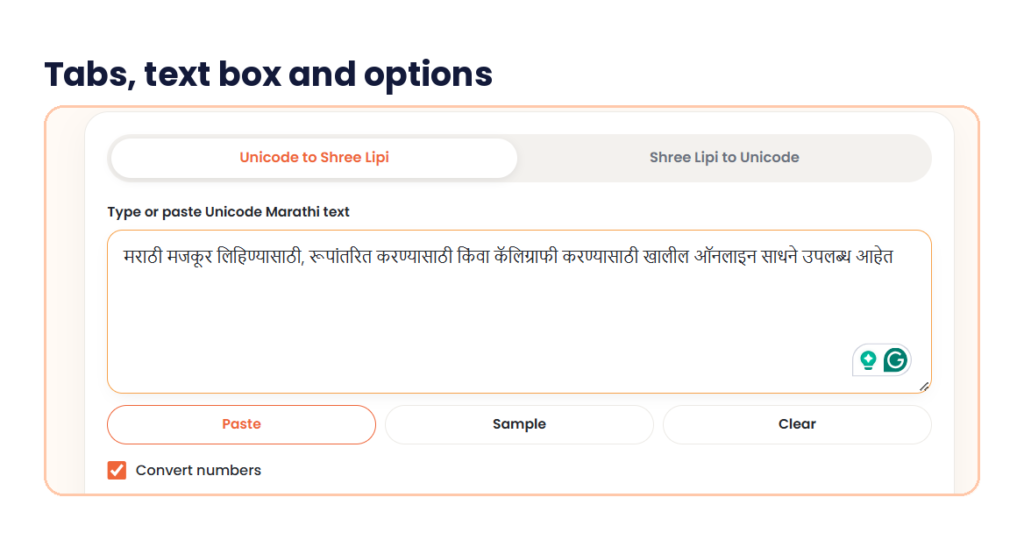
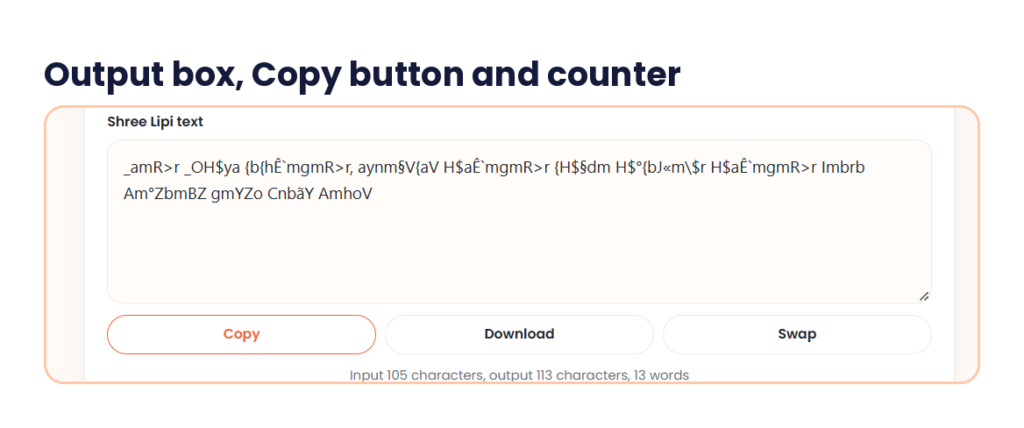
This Unicode to Shree Lipi converter has two tabs, Unicode to Shree Lipi and Shree Lipi to Unicode. On the first tab you type or paste text into the box labelled “Type or paste Unicode Marathi text”. Paste, Sample and Clear buttons sit under the box, next to a Convert numbers tick box. The result appears in the Shree Lipi text box, which has Copy, Download and Swap buttons. A counter under it shows the input characters, the output characters and the word count.
Below you will find what Shree Lipi is, why its text turns into English letters, the steps, and my own test with a real Marathi sentence in both directions. You will also find font install tips and fixes for the problems people hit most.
What is Shree Lipi, and how is it different from Unicode?
Shree Lipi is a family of Indian language fonts and typing software from Modular InfoTech, a company in Pune. The Devanagari fonts carry version numbers such as Shree Dev 0706, 0708 and 0714. They are commercial products. Shree Devanagari 0714, for example, is sold on the MyFonts store.
A 2008 Business Standard report named the DTP sector, newspapers, corporate offices and government as the main users of Shree-Lipi software. That report is old, so ask your own printer whether they still want this format.
Unicode is the standard behind almost every phone, browser, Google Doc and WhatsApp chat. Each Marathi letter has its own code in the Devanagari block of the Unicode Standard, which runs from U+0900 to U+097F. Any Devanagari Unicode font can show it, and Mangal is a common one on Windows.
Shree Lipi text works differently. The file stores ordinary English letters and symbols, and the Shree Lipi font draws them as Marathi. Remove the font and only the letters and symbols remain.
| Unicode Marathi | Shree Lipi text | |
|---|---|---|
| How the text is stored | Real Devanagari characters | English letters and symbols that the font draws as Marathi |
| Font needed | Any Devanagari Unicode font | The matching Shree Lipi font, installed on the computer |
| Shows on phones, websites and WhatsApp | Yes | Usually as random letters and symbols |
| Search and copy in Marathi | Works | Does not work without the font |
| Common use | Websites, apps, chats, Google Docs | Print and DTP files, older office documents |
Why Shree Lipi text looks like random English letters
Take the word मराठी. In Unicode it is five characters. After conversion in my test it became _amR>r, which is what a Shree Lipi file really contains. Paste that into WhatsApp, an email or a web page and you will see only those symbols, because those places have no Shree Lipi font.
The same thing happens in reverse. Text copied from an old print file can land in a Unicode field as a string of letters and signs. A Shree Lipi to Unicode converter fixes that.
A Shree Lipi font converter rewrites the characters in your text. That is why switching a Unicode paragraph to a Shree Lipi font in Word does nothing useful. Run the text through a Unicode to Shree Lipi converter first, then set the font.
Convert to Shree Lipi only for the file that needs it. Keep your Unicode original for websites, chats and anything you will edit later.
How to tell if your text is Unicode or Shree Lipi
Paste a few words into Google Docs or a WhatsApp message. If you see Marathi letters, the text is Unicode. If you see English letters mixed with symbols such as _amR>r, it is Shree Lipi or another older font, and you need the matching font to read it.
Type in Unicode first and convert last. The Marathi keyboard on your phone or in Windows produces Unicode, which is easy to correct and share. When the text is final, run the Unicode to Shree Lipi conversion once for the file that needs it.
How to use the Unicode to Shree Lipi converter in 3 steps
The Unicode to Shree Lipi converter is on this page. The screenshots below come from my own test with one Marathi sentence, and the real numbers are in the next section.
Step 1: Type or paste your Unicode Marathi text
Stay on the Unicode to Shree Lipi tab. Type your text in the first box, or press Paste to bring in text you copied. Sample and Clear sit next to it. Keep Convert numbers ticked if your text has digits. It was ticked in my test, but my sentence had no digits.
Step 2: Check the Shree Lipi text and copy it
The Shree Lipi text appears in the box below. Look at the counter. In my test it read “Input 105 characters, output 113 characters, 13 words”. The output is longer here because some Marathi signs take extra characters in Shree Lipi. Press Copy to take the text, or Download to save it. Then paste it into your design file and set the font to the Shree Lipi font you installed.
Step 3: Switch tabs to check the text
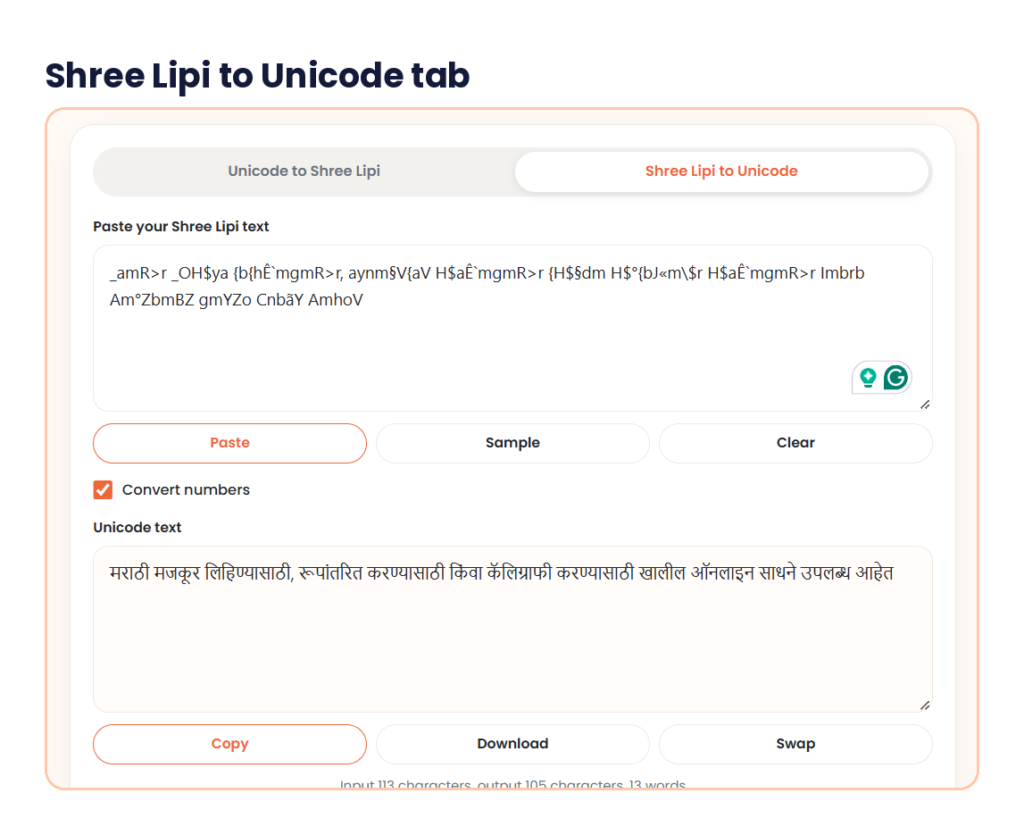
Open the Shree Lipi to Unicode tab and paste the Shree Lipi text into the box labelled “Paste your Shree Lipi text”. The Unicode text box shows your Marathi again. If it matches your original, the conversion kept every letter. In my test it did.
My test: one Marathi sentence, both directions
I used this sentence, which has 13 words and 105 characters:
मराठी मजकूर लिहिण्यासाठी, रूपांतरित करण्यासाठी किंवा कॅलिग्राफी करण्यासाठी खालील ऑनलाइन साधने उपलब्ध आहेत
The Unicode to Shree Lipi converter gave this on its first tab, with 113 characters and 13 words:
_amR>r _OH$ya {b{hÊ`mgmR>r, aynm§V{aV H$aÊ`mgmR>r {H$§dm H$°{bJ«m\$r H$aÊ`mgmR>r Imbrb Am°ZbmBZ gmYZo CnbãY AmhoV
I pasted that output into the Shree Lipi to Unicode tab. The counter read “Input 113 characters, output 105 characters, 13 words”, and the Marathi sentence came back looking the same as my original. The 105 characters match the original count.

Here are six of the 13 words. I counted the characters myself.
| Unicode word | Shree Lipi text | Characters before | Characters after |
|---|---|---|---|
| मराठी | _amR>r | 5 | 6 |
| किंवा | {H$§dm | 5 | 6 |
| कॅलिग्राफी | H$°{bJ«m\$r | 10 | 11 |
| ऑनलाइन | Am°ZbmBZ | 6 | 8 |
| खालील | Imbrb | 5 | 5 |
| उपलब्ध | CnbãY | 6 | 5 |
Two things stand out. First, the word किंवा starts with the symbol { in Shree Lipi, although क comes first in Unicode. That symbol draws the short i sign (ि). Unicode stores that sign after the letter and leaves the font to draw it on the left. The Shree Lipi text puts it first, the way you see it on the page.
Second, उपलब्ध gets shorter, from 6 characters to 5, and ऑनलाइन grows from 6 to 8. You cannot convert by swapping one letter for one symbol. Changing the font on Unicode text will not do it either, so a converter is needed.
I did not test digits, mixed English and Marathi, long text, or the Swap and Download buttons. I describe those only by name.
Shree Lipi to Unicode converter: bring old text back
Use the Unicode to Shree Lipi tab for new work and the second tab when you have text from an old file that you need on a phone, on a website or in Google Docs. Switch to Shree Lipi to Unicode, paste the text, and read the result in the Unicode text box. Copy it from there.
As a Shree Lipi to Unicode converter, the tab expects text that was typed in a Shree Lipi font. Text from another legacy font family, such as Kruti Dev, uses a different layout and can come out wrong. Copy the text straight from the file and do not retype it.
Shree Lipi Unicode conversion works in both directions on this page. You can also use the second tab to check a result, as I did in step 3.
Which Shree Lipi font should you install?
Shree Lipi comes in versions such as 0706, 0708 and 0714. They look alike, but the symbols behind a few letters can differ between versions. Text made for one version may show a few wrong signs in another.
This Unicode to Shree Lipi converter shows one output box and no font menu in my screenshots, so you get one Shree Lipi layout. If a few signs look wrong in your font, try another version and tell your printer which one you used. Any Shree font converter, this one included, gives text that looks right only in the font it was built for.
On Windows, right-click the font file, choose Install, then restart Word, CorelDRAW or Photoshop so the font shows in the list. Shree Lipi fonts are licensed software, so use the copy your office or printer already has.
Using the converted text in Word, CorelDRAW and Photoshop
People use Shree Lipi text in Word, CorelDRAW, Photoshop and PageMaker. I have not tested the output in each program, so paste one line first and look at it.
- Paste the Shree Lipi text, select it, and set the font to the Shree Lipi font you installed.
- Set English words in a normal font. A Shree Lipi font draws English letters as Marathi shapes.
- Turn off auto-correct for that text, because it can change symbols that the font reads as letters.
- Edit the Unicode and convert again, instead of fixing letters inside the Shree Lipi text.
- Save a copy of your Unicode original.
Common problems when you convert Unicode to Shree Lipi
Most problems after a conversion come from the font, so check that first.
- The result shows English letters and symbols. The Shree Lipi font is missing, or the text is set in another font. Install the font and select it for that text.
- A few signs look wrong. Try another Shree Lipi version, such as 0708 instead of 0714, or ask your printer which one they use.
- The text broke after you edited it by hand. In Shree Lipi, the signs sit in the order you see on screen, not in the Unicode order. Fix the Unicode and convert again.
- Numbers look different. The Convert numbers box controls them. My sentence had no digits, so test a short number before a big job.
- A long text looks fine at the start only. I tested one sentence. Convert long text in parts and check each part.
- The text looks wrong on WhatsApp or a website. Those places need Unicode. Paste your Unicode original there.
Before you send the file to a printer
Ask which font and version they use before you run the Unicode to Shree Lipi conversion, and send your Unicode text with the converted file. Whichever Shree Lipi font converter you pick, the printer’s version decides what looks right. A PDF proof of the layout helps them spot a wrong sign, and it saves a second print run.
If the same job needs a photo at 300 DPI, we have a DPI converter to help with this. If you need the plain text as a file, try our Text to PDF tool and check that the Marathi letters show correctly in the result.
Quick answers before you start
What is Unicode to Shree Lipi conversion?
It changes Marathi text typed in Unicode into text for a Shree Lipi font. The letters look the same once the font is installed, but the file stores different characters. A Unicode to Shree Lipi converter does this for you.
How do I convert Unicode to Shree Lipi online?
Paste your Marathi text into the first box on the Unicode to Shree Lipi tab and copy the result from the Shree Lipi text box. Then paste it into your design file and set the Shree Lipi font.
Can I convert Shree Lipi to Unicode on the same page?
Shree Lipi Unicode conversion works both ways on the same page. Open the Shree Lipi to Unicode tab, paste your text and read the Unicode text box. In my test, a 113-character Shree Lipi text came back as 105 Unicode characters.
Why does my Shree Lipi text show English letters?
The computer has no Shree Lipi font for that text. Install the matching font and set it on the text. Websites and chat apps cannot show it, so use Unicode there.
Which Shree Lipi font should I use, 0708 or 0714?
Use the one your printer or office uses. Versions can map a few letters differently, so confirm with them before you run any Shree font converter on a large file.
Can I post Shree Lipi text on WhatsApp or a website?
Not as Shree Lipi. People without the font will see symbols and English letters. Post the Unicode text, and use the Unicode to Shree Lipi conversion only for the print file.
Open the Unicode to Shree Lipi converter, paste your Marathi text and copy the Shree Lipi result into your design file. Check the first line in your own font before you convert a whole page, and keep the Unicode original safe.