
A percentage calculator for marks does one boring job well. It stops you typing 79.46 when the real answer is 79.64, ten minutes before a form closes.
The tool covers two situations. Most people start with plain marks. Others want to know what they must score next, which works backwards from a target.
Percentage Calculator For Marks
Work out your percentage from obtained and total marks, add multiple subjects, convert CGPA, or find the marks you need for a target. Results update as you type. Everything happens inside your browser.
Your marks
Subjects
Your CGPA
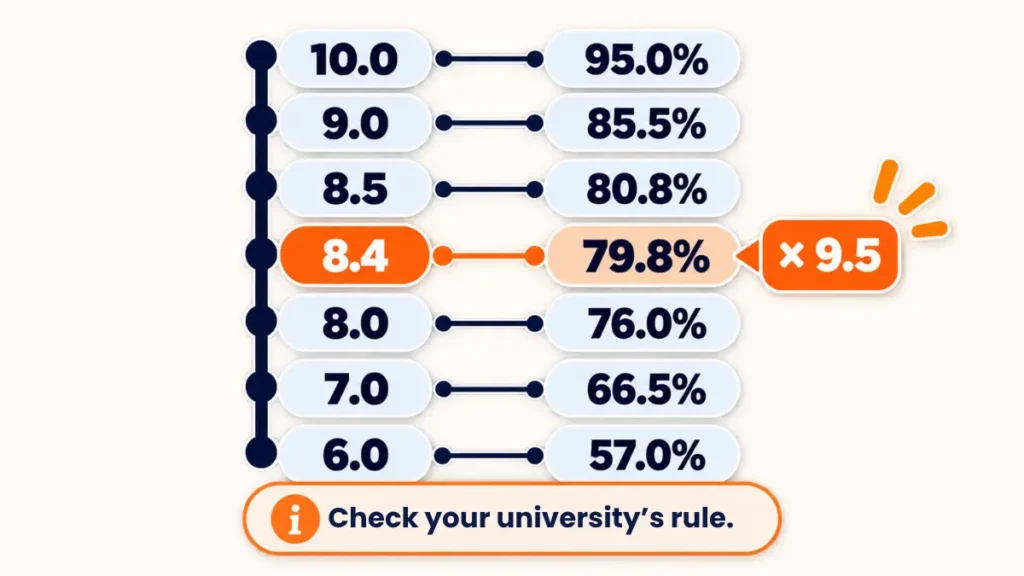
Conversion rules differ by board and university. Use the formula your institution prescribes. Custom works as: percentage = CGPA x multiplier + added value.
Target
Target and progress
For more than one remaining exam, enter their combined total marks.
Result
How to Calculate Percentage of Marks
Marks divided by total marks, times 100. That’s it. Once you’ve got that, how to calculate percentage of marks stops being a question, whatever the exam.
Try it with 372 out of 450. The division gives 0.8267, and times 100 that’s 82.67%. Keep both decimals unless your form wants a whole number, since some portals are picky about this.
Learn the plain percentage idea once and every other conversion gets easier. It’s always a part divided by a whole, scaled to 100.
Marks to Percentage With Several Subjects
Real mark sheets have more than one line. You add up everything you scored, add up every maximum, and divide once. A good marks percentage calculator does exactly this for you. Doing marks to percentage this way keeps every subject weighted by its real size.
Here’s a worked example. Hindi 68/100, English 74/100, Maths 91/100, Science 83/100, Social Science 77/100, and Computer 45/50. Your total is 438. The maximum is 550. Divide 438 by 550 and you get 79.64%.
See that Computer paper? Its maximum is 50, not 100. Leave it that way. Converting it to 100 first only adds a step where mistakes creep in.
Don’t Average the Percentages
This one trips up a lot of people. Someone works out each subject’s percentage, adds them up, divides by the subject count, and trusts the answer. It looks fair. With mixed maximums, it’s wrong.
Paper A: 40 out of 50, so 80%. Paper B: 60 out of 100, so 60%. Average the two and you get 70%. The real result is 100 out of 150, which is 66.67%.
Over three points of difference can sink a cutoff. So when maximums differ, add the marks first. Divide last.
Percentage to Marks: Working Backwards
Sometimes you know the target and need the marks. The formula flips. Multiply the percentage by the total, then divide by 100.
Want 75% in a paper out of 600? You need 450 marks. That’s the quick version of percentage to marks.
Now a trickier case. Your target is 70% across 800 marks, which means 560 marks. You’ve scored 340 out of the first 500. The remaining paper is worth 300 marks, so you need 220 of them. That’s about 73.33% on the last paper.
Run this before an exam, not after. It tells you exactly how much each remaining paper has to deliver.
When a Form Asks for the Best Five Subjects
Some boards and admission forms count only your best five subjects. Others want every subject. The two methods give different percentages from the same mark sheet.
Read the instruction on your form carefully. If it says best five, pick those five, add their marks, and divide by their total maximum. If it says all subjects, use everything. The official notification always wins over any general rule.
What a Good Percentage Calculator of Marks Should Do
Not every online tool is careful. A reliable percentage calculator of marks should let you set a different maximum for each subject. It should also warn you when marks go above the maximum, since that’s almost always a typing slip.
Look for a visible total and subject count too. If you entered six subjects and it shows five, you’ll spot the problem at once. Decimals matter as well. A tool that silently rounds to a whole number can cost you the exact figure a form wants.
Finally, check what happens with blank rows. A blank should count as nothing, not as zero out of 100.
Where You’ll Need This Number
An exam percentage calculator comes up more often than students expect. Scholarship forms ask for it. So do college admissions, entrance exam eligibility sections, and job applications that list minimum marks.
Eligibility cutoffs like 50% or 60% usually apply to the aggregate. Being short by a fraction can matter, so don’t round up yourself. Enter the exact figure the form allows, and let the portal handle its own rounding.
Common Mistakes When Converting Marks
Mixing up total marks and maximum marks is one. Using the marks of a re-evaluated paper without updating the total is another. Both change the answer without any obvious warning.
Leaving out a failed or optional subject causes trouble too. Some forms want every subject counted, even the weak ones. Others exclude an additional subject. Match the rule on your form, not what a friend did last year.
Rounding too early is the quiet culprit. If you round each subject, small errors pile up. Calculate first, round once at the end.
Quick Answers on Marks
How do I find the percentage if my subjects have different maximum marks?
Add all the marks you scored. Add all the maximums. Divide the first total by the second, then multiply by 100.
How do I find the marks I need for a target percentage?
Multiply the target percentage by the total marks, then divide by 100. Subtract what you have already scored to see what is left.
Can I use the calculated percentage on an official form?
Treat it as an estimate. If your mark sheet prints an official percentage, use that. The calculator is best for checking and planning.
What decimals should I keep?
Two is the safe default. Some portals only take whole numbers, and the form usually says so.
Can I use a marks percentage calculator online for just one exam?
Sure. Enter one subject with your marks and the total, and the percentage appears straight away.
Conclusion
A percentage calculator for marks gives you the correct number the first time. Add your subjects with their real maximums. Or work backwards from a target. Then check the figure against your form’s own rule before you submit.