
You need a JPG to PDF 300 KB file when a portal shows “File size must not exceed 300 KB”. Your phone or scanner makes a JPG three or four times bigger than that. Job forms, college admissions and scholarship pages often ask for marksheets and certificates as PDF.
The size limit is often between 100 KB and 1 MB. This converter turns your JPG into a PDF and keeps the file inside the size your form needs. You pick a target like 100, 150, 200, 300 or 500 KB, or type your own.
JPG to PDF Converter
Combine JPG, PNG and WEBP images into a single PDF instantly. Everything happens inside your browser. No uploads. 100% private.
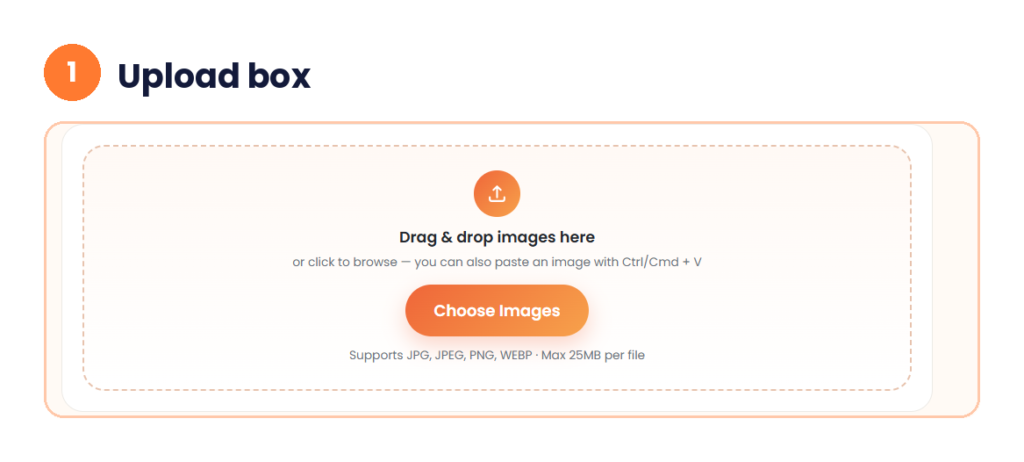
Drag & drop images here
or click to browse — you can also paste an image with Ctrl/Cmd + V
Supports JPG, JPEG, PNG, WEBP · Max 25MB per file
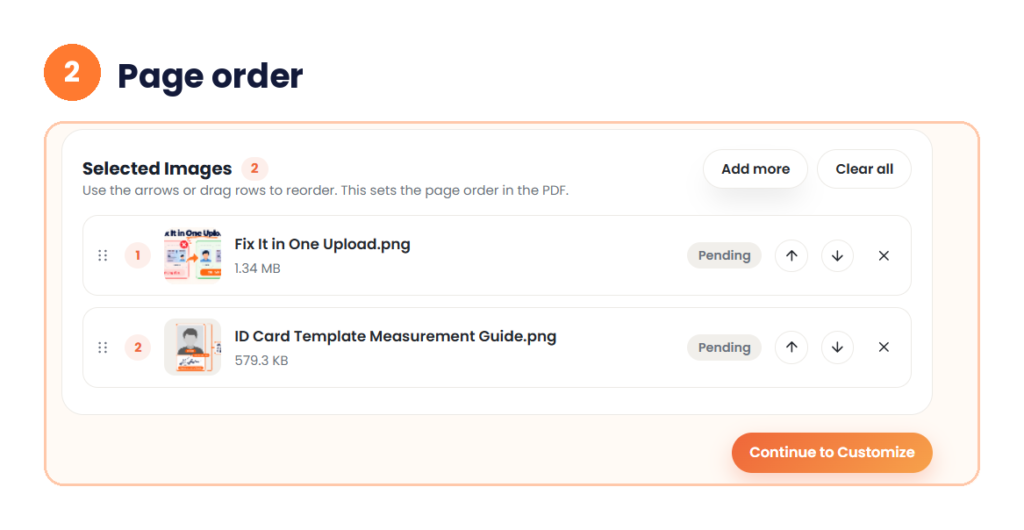
Selected Images 0
Use the arrows or drag rows to reorder. This sets the page order in the PDF.
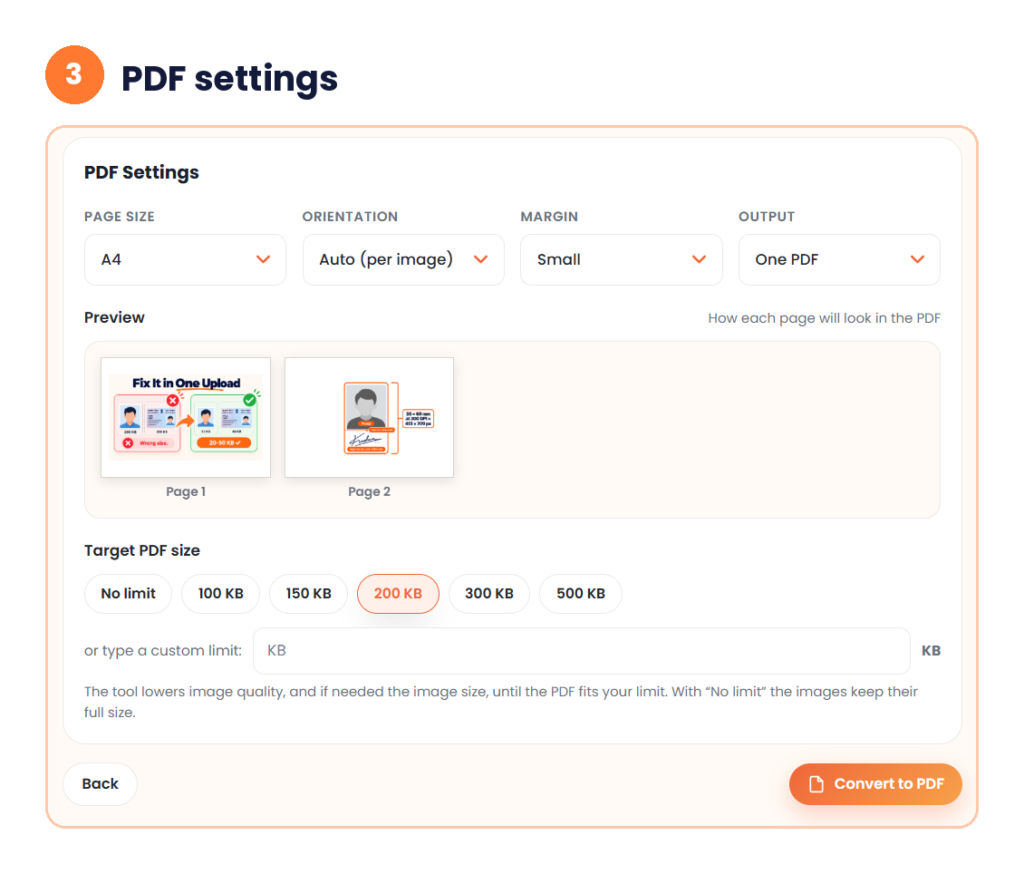
PDF Settings
The tool lowers image quality, and if needed the image size, until the PDF fits your limit. With “No limit” the images keep their full size.
Building PDF…
Summary
Your PDF
What Is a JPG to PDF 300 KB Converter?
This kind of converter does two jobs. It changes the format from JPG to PDF. It also shrinks the file so the PDF stays under 300 KB. The second job matters more. A normal conversion without size control often gives a file that is too big for the form.
Portals set a limit like 300 KB to keep uploads fast and servers light. It also stops people from sending huge camera files. Many forms also ask for a PDF, not an image. This is common for marksheets, certificates and signed declarations.
How to Convert JPG to PDF 300 KB Online
You do not need any software. Follow these steps.
Step 1: Upload your JPG images
Drag your files into the box, or tap Choose Images. On a phone, pick the photo from your gallery. You can also paste an image with Ctrl or Cmd + V. The tool takes JPG, JPEG, PNG and WEBP files up to 25 MB each.
Step 2: Arrange the pages
Your files show in a list called Selected Images. The number on each row is the page number in the PDF. Use the up and down arrows, or drag the rows, to change the order. Tap the X to remove a file. Need more files? Click Add more. Then click Continue to Customize.
Step 3: Choose the PDF size
The PDF Settings screen has four options. Page size shows A4. Orientation shows Auto, so each image gets the shape that fits it. Margin shows Small. Output shows One PDF. The Preview shows how each page will look.
Now pick the Target PDF size. You can choose No limit, 100 KB, 150 KB, 200 KB, 300 KB or 500 KB. You can also type your own limit in KB. The tool lowers the image quality, and the image size if needed, until the PDF fits your limit. With No limit, your images keep their full size. Click Convert to PDF.
Step 4: Check and download
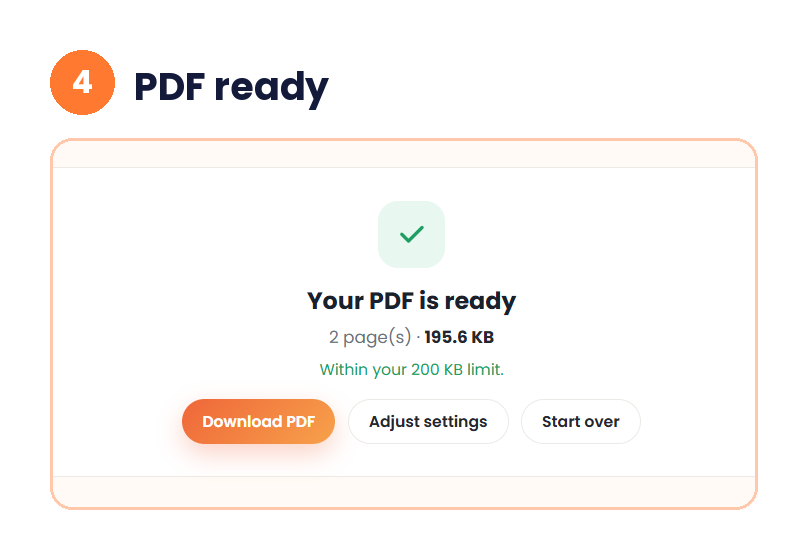
The tool shows “Your PDF is ready” with the number of pages and the file size. A green line says “Within your 200 KB limit” or the limit you chose. Click Download PDF. Not happy with the result? Click Adjust settings to change the size, or Start over.
Open the PDF and zoom in on the text before you upload it.
My Test: Two Large Images to One PDF
I tested the tool with two PNG images. One was 1.34 MB and the other was 579.3 KB, about 1.9 MB together. I kept A4, Auto orientation, Small margin and One PDF. I chose the 200 KB target.
The tool made a PDF of 2 pages at 195.6 KB. It showed “Within your 200 KB limit.” That is about 90% smaller than the two images together. The preview showed both pages before I converted.
I also ran two small WebP images of 28.0 KB and 27.8 KB with No limit. The PDF came out at 123.8 KB, bigger than the images together. So set a target. Without one, the images keep their full size.
For a 300 KB limit, pick the 300 KB preset in the same way. Your result changes with your images.
Why This Tool Works When You Have a Deadline
The tool works on a phone. You can convert a photo of your marksheet at home or at a cyber café. You do not need to sign up or log in. This saves time when the form closes today.
There is one more difference. Many online converters upload your file to a server and delete it later. This tool runs in your browser, so your file stays on your device. This matters for a signed paper or an ID scan.
When Do You Need a 300 KB PDF?
Many Indian job forms, college admissions and scholarship portals set exact file sizes. Government job forms like SSC, UPSC and state recruitment often list a size for the photo, signature and certificates. College admission forms do the same during online counselling. Marksheets and category certificates usually go in as PDF. Banks and government schemes sometimes ask for ID proof under a set size too.
Here is a real example. The Assam elementary teacher recruitment 2024 upload list gives these limits.
| Document | Format | Size limit |
|---|---|---|
| Passport photo | JPG only | 50 KB |
| Signature | JPG only | 50 KB |
| Admit card (HSLC) | PDF only | 300 KB |
| TET certificate | PDF only | 300 KB |
| Graduation certificate | PDF only | 300 KB |
| Caste certificate | PDF only | 300 KB |
| 12th marksheets (all in one PDF) | PDF only | 400 KB |
| Graduation final semester marksheet | PDF only | 400 KB |
Source: the “documents to be uploaded” notice on rectteduassam.in, checked in November 2026. Your own notice may be different, so read it before you upload.
JPG to PDF 50 KB, 100 KB, 150 KB, 300 KB and 400 KB
Not every form asks for 300 KB. The limit can be from 50 KB to 2 MB. Here is what each size is used for. These are examples, not fixed rules.
JPG to PDF 50 KB is very small. It works for a plain signature or a simple one-page proof. Type 50 in the custom limit box. Text can look soft at this size.
JPG to PDF 100 KB is common for a photo or signature. It is a ready preset in the tool. Some forms ask for a file between 50 KB and 100 KB. Others say under 100 KB. Check if the form has a minimum too.
JPG to PDF 150 KB gives a little more room. It is a preset too. It is common for ID proof and small supporting papers.
300 KB is the most asked size. It keeps a marksheet or certificate readable and meets most limits.
JPG to PDF 400 KB is for several marksheets in one PDF, like the Assam list above. Type 400 in the custom limit box.
JPG to PDF 1 MB and 2 MB are for resumes, long scans and property papers.
| Size | Common use |
|---|---|
| 50 KB | Signature, simple one-page proof |
| 100 KB | Photo, signature, small proof |
| 150 KB | ID proof, supporting papers |
| 300 KB | Marksheets, certificates |
| 400 KB | Several marksheets in one PDF |
| 1 MB | Resumes, multi-part documents |
| 2 MB | Long scans, property papers |
If your form lists a size in MB, our MB to KB converter gives you the KB value.
How Many Images Fit in a 300 KB PDF?
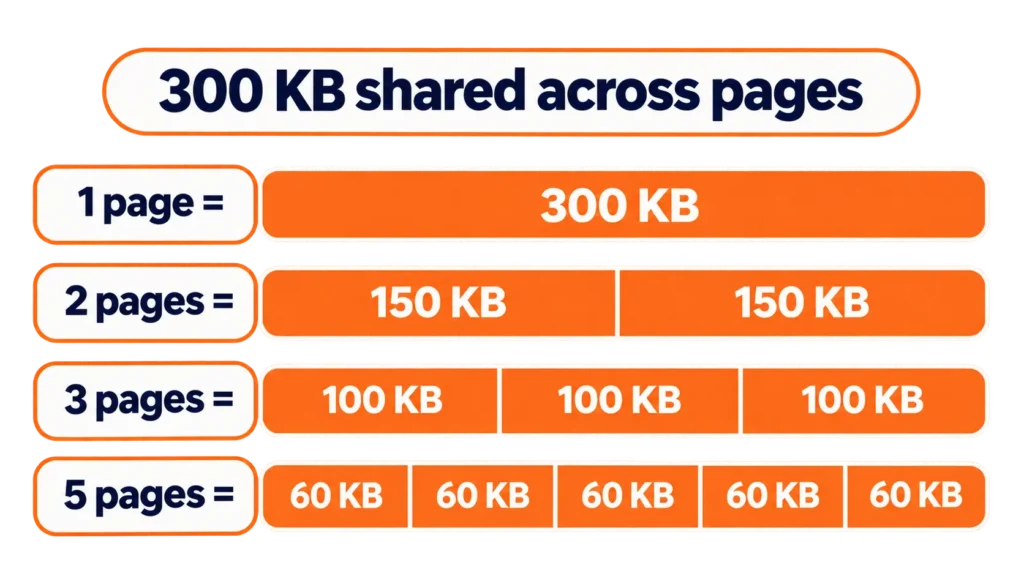
The size limit covers the whole PDF, not each page. Divide the limit by the number of pages. This tells you how much room each page gets.
| Pages | Space per page at 300 KB | Space per page at 400 KB |
|---|---|---|
| 1 | 300 KB | 400 KB |
| 2 | 150 KB | 200 KB |
| 3 | 100 KB | 133 KB |
| 5 | 60 KB | 80 KB |
A marksheet with plain text can work at 60 KB a page. A photo with many colours needs more. If a PDF with five pages looks too soft, split it into two files, if the form allows it.
Why Some Photos Compress Better Than Others
Two photos of the same size can behave very differently. Flat areas like sky, plain walls and blank paper compress easily. Busy parts like fabric, grass and small print take more space. Dark indoor shots have hidden grain. This grain uses up your size budget even when the photo looks fine.
A photo sent on WhatsApp is already compressed once, so it is easy to convert. Screenshots are light too, because their colours are flat. A raw photo from your phone camera is the heavy one. One 4 MB camera photo can use up most of your size budget on its own.
Page shape matters a little. Tall pages stack better in a PDF than wide ones.
Tips for a PDF Close to 300 KB
Start with a clear photo of normal size. Phone cameras often make images over 2 MB. A very large start means heavy compression later, and this hurts clarity.
Crop the borders and background before you convert. Extra space adds size and gives nothing useful. A well-lit photo compresses better than a blurry one.
Compress only as much as you need. Too much compression blurs text and makes signatures hard to read. A file can meet the size limit and still be rejected. Marksheets and forms are mostly flat text, so they need less compression than a detailed photo.
Want to keep quality? Use a flat, even light, hold the phone straight, and avoid shadows. A clean photo needs less compression to reach 300 KB. Always zoom in on the final PDF before you upload it.
Need to add a signature to your photo first? Try our merge photo and signature tool. For a passport photo, use our passport size photo maker.
Common Upload Errors and How to Fix Them
| What the portal says | What to do |
|---|---|
| File size must not exceed 300 KB | Run the images through the converter and set a smaller target |
| Only PDF allowed | Convert your JPG to PDF. Do not rename the file |
| File is corrupted or cannot be opened | Convert again from the first JPG and download a fresh file |
| Document not readable | Use a clearer photo and a larger size target |
| Size below the minimum | Raise the target, for example to 250 KB |
Do not rename a JPG to end in .pdf. Many portals check the real file type, and the upload fails.
How to Check the Size of Your PDF
Check the size before you upload. On Windows, right-click the file and choose Properties. On a phone, open the file details in your file manager. Look at the size in KB.
Some systems count 1 KB as 1,000 bytes and some count 1,024. A file shown as 298 KB on your phone can show a little different on the portal. Aim for about 280 KB when your limit is 300 KB. This gap keeps you safe.
What If Your PDF Is Already Over 300 KB?
If you still have the JPG, upload it here again. Do not compress the same file many times. Each round loses quality.
If you only have the PDF, turn its pages back into images with our PDF to JPG converter. Then run those images through this tool. Check the text before you upload.
Quick Answers Before You Start
How do I convert JPG to PDF 300 KB?
Upload your JPG, click Continue to Customize, and choose 300 KB under Target PDF size. Click Convert to PDF, then Download PDF. Check that the text is readable.
Can I make a PDF exactly 300 KB?
The tool lowers quality until the PDF fits your limit. The PDF ends at or under 300 KB, and the exact size changes with the image.
How do I convert JPG to PDF less than 300 KB or under 100 KB?
Pick the 100 KB preset, or type a smaller limit like 50. Crop the borders first. Check the text, because very small files can look soft.
Can I combine many JPG images in one PDF?
Yes. Upload all the images and put them in order with the arrows. Keep Output on One PDF. The size limit covers the whole PDF.
Does a WhatsApp photo convert differently from a camera photo?
Yes. WhatsApp photos and screenshots are already light, so they convert faster than a raw camera photo.
Is my file safe?
The tool runs in your browser, so your file does not go to a server.
Conclusion
A PDF under 300 KB saves you from rejected uploads and repeat tries. It works for a marksheet, a certificate or a signed paper. Start with a clear image, compress only as much as you need, and check the text. You will have a PDF ready in a minute.